Enum type
An enum type defines a fixed set of named values, called enum members. Use an enum type when a property must contain one value from a controlled list, such as an order status or a unit of measure.
Neos generates enum types for the backend and, when their scope includes the frontend, for UI code.
Create and configure an enum type
In Neos Studio, select the Enumerations item in one of these module folders, then select +:
Sharedfor enum types used by backend and frontend code.Backendfor enum types used only by backend code.Frontendfor enum types used only by frontend code.
The selected folder sets the initial scope. You can change the scope later.
Enum type properties
| Property | Description |
|---|---|
| Name | The name of the generated C# enum type. |
| Description | An optional functional description displayed by code editor IntelliSense and exposed through runtime metadata. |
| Documentation | An optional help text displayed from the hint button in UI views. |
| Persistence type | Specifies whether persisted values are strings or numbers. The default is String. |
| Module | The module that owns the enum type. |
Changing scope
Before changing from Shared to a narrower scope, search the metadata and business code for usages of the enum type. Removing backend generation causes generation or compilation failures for backend usages. Removing frontend generation can leave frontend metadata references that fail at runtime. Regenerate and build the affected targets after changing the scope.
Persistence type and persisted values
The persistence type determines the data type used when an enum value is stored by a persisted property:
- With
String, Neos persists the member name by default. Set a member's Persisted value to store a stable string that differs from its name. - With
Number, each member's Persisted value must be a valid number.
Persisted values are part of the data contract. Do not change a persisted value after data has been stored unless the existing data is migrated at the same time. String persisted values must be unique within an enum type.
Enum members
An enum type contains ordered members. Configure these properties for each member:
| Property | Description |
|---|---|
| Name | The identifier used in code, for example OrderStatus.Confirmed. |
| Caption | Optional localized text displayed to users. If it is not defined, UI components display the member name. |
| Persisted value | Optional value stored for the member. Its format must match the enum type's persistence type. |
| Position | Display and generation order of the member. |
| Module | The module that owns the member. |
Use enum types in code
Enum types generate C# enums for server code. Shared and frontend enum types also generate TypeScript string enums for UI code. Use the generated members instead of string literals whenever the enum type is known at compile time.
Server-side code
Use the generated enum in server methods, event rules, validation rules, and business assembly code.
return filterOperator switch
{
    FilterOperator.Equal => "eq",
    FilterOperator.NotEqual => "ne",
    FilterOperator.Greater => "gt",
    FilterOperator.GreaterOrEqual => "ge",
    FilterOperator.Less => "lt",
    FilterOperator.LessOrEqual => "le",
    FilterOperator.In => "in",
    FilterOperator.StartsWith => "startswith",
    FilterOperator.EndsWith => "endswith",
    FilterOperator.Contains => "contains",
    FilterOperator.IsMatch => "search.ismatch",
    _ => throw new NotSupportedException(),
};
UI code
Use the generated enum in UI view and UI component code.
MessageType messageType;

switch (Parameters.Severity)
{
    case "danger":
        messageType = MessageType.Danger;
        break;
    case "info":
        messageType = MessageType.Info;
        break;
    case "positive":
        messageType = MessageType.Positive;
        break;
    default:
        messageType = MessageType.Warning;
        break;
}

ShowMessageAsync(messageType, Resources.Core.Detail, Computeds.Detail);
Note
Generated TypeScript enum types are string-based. An enum member can therefore be compared with its string value when required by an external contract.
Retrieve enum member metadata
Use enum member metadata to display a caption, enumerate available members, or resolve an enum type dynamically. The server and UI expose different APIs because captions are localized at different stages.
Server-side code
Inject IEnumMetadataProvider to retrieve metadata for a generated enum type. EnumMemberMetadata.Caption is a LocalizableString?; resolve it for the language needed by the caller.
using GroupeIsa.Neos.Domain.Enums;

public sealed class UnitService
{
    private readonly IEnumMetadataProvider _enumMetadataProvider;

    public UnitService(IEnumMetadataProvider enumMetadataProvider)
    {
        _enumMetadataProvider = enumMetadataProvider;
    }

    public string GetUnitCaption()
    {
        EnumMemberMetadata? member = _enumMetadataProvider
            .GetEnumMembers<Unit>()
            .FirstOrDefault(member => member.Name == nameof(Unit.Kg));

        return member?.Caption?.GetTranslationOrDefault("en") ?? nameof(Unit.Kg);
    }
}
Use GetEnumMembers(string enumName) when the enum type is known only at runtime. For a complete description of the runtime metadata provider, see Runtime metadata provider.
UI code
In a UI view or UI component, Caption is already a localized string.
From an enum UI view property
When a UI view property is associated with an enum type, use its enum metadata.
IEnumMember kgMember = Properties.Unit.Enum.Kg;
IEnumMember memberByName = Properties.Unit.GetEnumMember("Kg");
IEnumMember[] members = Properties.Unit.GetEnumMembers();
From the Enums property
Use Enums when no UI view property is associated with the enum type.
IEnumMember kgMember = Enums.ProductUnit.Kg;
IEnumMember memberByName = Enums.ProductUnit.GetEnumMember("Kg");
IEnumMember[] members = Enums.ProductUnit.GetEnumMembers();
From an enum name at runtime
Use FindEnum when the enum may not exist, or GetEnum when a missing enum should raise an error.
IEnumType? orderStatus = FindEnum("OrderStatus");
IEnumMember[] members = orderStatus?.GetEnumMembers() ?? [];
In a UI template
Use a member property directly in a UI template to display its caption.
<text>@Properties.Unit.Enum.Kg.Caption</text>
<text>@Enums.ProductUnit.Kg.Caption</text>
Methods cannot be called directly from a UI template. Expose the result through a property getter or computed when a member must be selected dynamically.
Restrict enum members for a property
You can configure which members are available for a specific property without changing the enum type itself. This supports a static restriction in an entity view and a dynamic restriction in a UI view.
Entity view property values
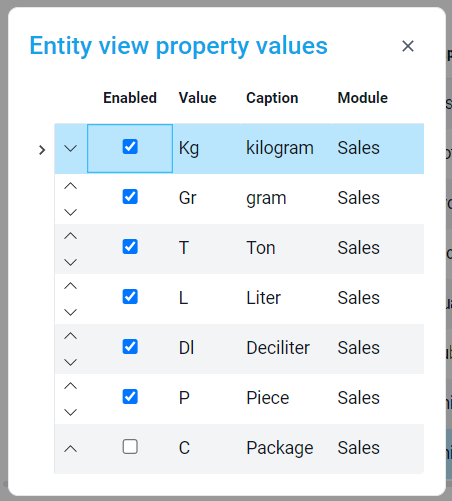
Select the enum property in the entity view. Select Values beside Enum type, then enable the members available for that property. You can also override each member's caption and position for that property.
UI view property values
Select the enum property in the UI view. Select Values beside Enum type, then define an Enabled expression for each member when availability depends on the current item.
return Item?.Product?.SoldByWeight ?? true;
Warning
The expression is also evaluated in the filter bar, where Item can be null. Handle this case to avoid runtime errors.
Standard form fields render enum properties as comboboxes, and bound comboboxes infer the enabled members from property metadata. See Form field and Combobox.