License Management
License Management is a cluster that allows you to set up your licenses before you affect them to your tenants.
How does it work ?
Here is a diagram illustrating how the License Management cluster is used and its workflow:
graph TD

%% === Clients / Tenants ===
subgraph Tenant
    T1[AGIS]:::tenant
    T2[TRANSCAUSSE]:::tenant
end

subgraph Client
    C1[AGIS]:::client
    C2[TRANSCAUSSE]:::client
end

T1 <---> C1
T2 <---> C2

%% === Commercial Solutions ===
SC1[TMS Start]:::solution
SC2[TMS MRoad]:::solution

%% === Commercial Modules ===
Core[Core]:::module
PersoEcrans[Screen Customization]:::module
Notifications[Notifications]:::module
Export[Data Export]:::module

SC1 --> Core
SC2 --> PersoEcrans
SC2 --> Notifications
SC2 --> Export

%% === Metrics ===
MaxUsers[Maximum number of users]:::metrique
MaxFactures[Maximum number of invoices per year]:::metrique

Core --> MaxUsers
Core --> MaxFactures

%% === Functionalities ===
BaseFunc[Basic functionalities]:::fonctionnalite
PersoGestion[Customization management]:::fonctionnalite
NotifFunc[Notifications]:::fonctionnalite
ExportFunc[Data export]:::fonctionnalite

Core --> BaseFunc
PersoEcrans --> PersoGestion
Notifications --> NotifFunc
Export --> ExportFunc

%% === Technical Functions ===
Settings[Settings]:::tech
People[People]:::tech
FullAccess[FullAccess]:::tech
UserPermissionModule[UserPermissionModule]:::tech
UICustomization[UICustomization]:::tech
NotificationCenter[NotificationCenter]:::tech
NeosDataExport[NeosDataExport]:::tech

BaseFunc --> Settings
BaseFunc --> People
BaseFunc --> FullAccess
BaseFunc --> UserPermissionModule

PersoGestion --> UICustomization
NotifFunc --> NotificationCenter
ExportFunc --> NeosDataExport


%% === STYLES ===
classDef tenant fill:#e5f5e0,stroke:#97cc9c,color:#000;
classDef client fill:#88c3ff,stroke:#417dc1,color:#000;
classDef solution fill:#e1b7f0,stroke:#c94fe3,color:#000;
classDef module fill:#ffe066,stroke:#e0b800,color:#000;
classDef metrique fill:#f76c6c,stroke:#d64545,color:#fff;
classDef fonctionnalite fill:#ffa94d,stroke:#e67e22,color:#000;
classDef tech fill:#66cc88,stroke:#339966,color:#000;
Legend
- 🟢 Technical Functions
- 🟠 Features
- 🔵 Customers
- 🟣 Commercials Solutions
- 🔴 Metrics
- 🟡 Commercials Modules
- 🔘 Tenants
How to configure a license from A to Z
1. Technical Functions
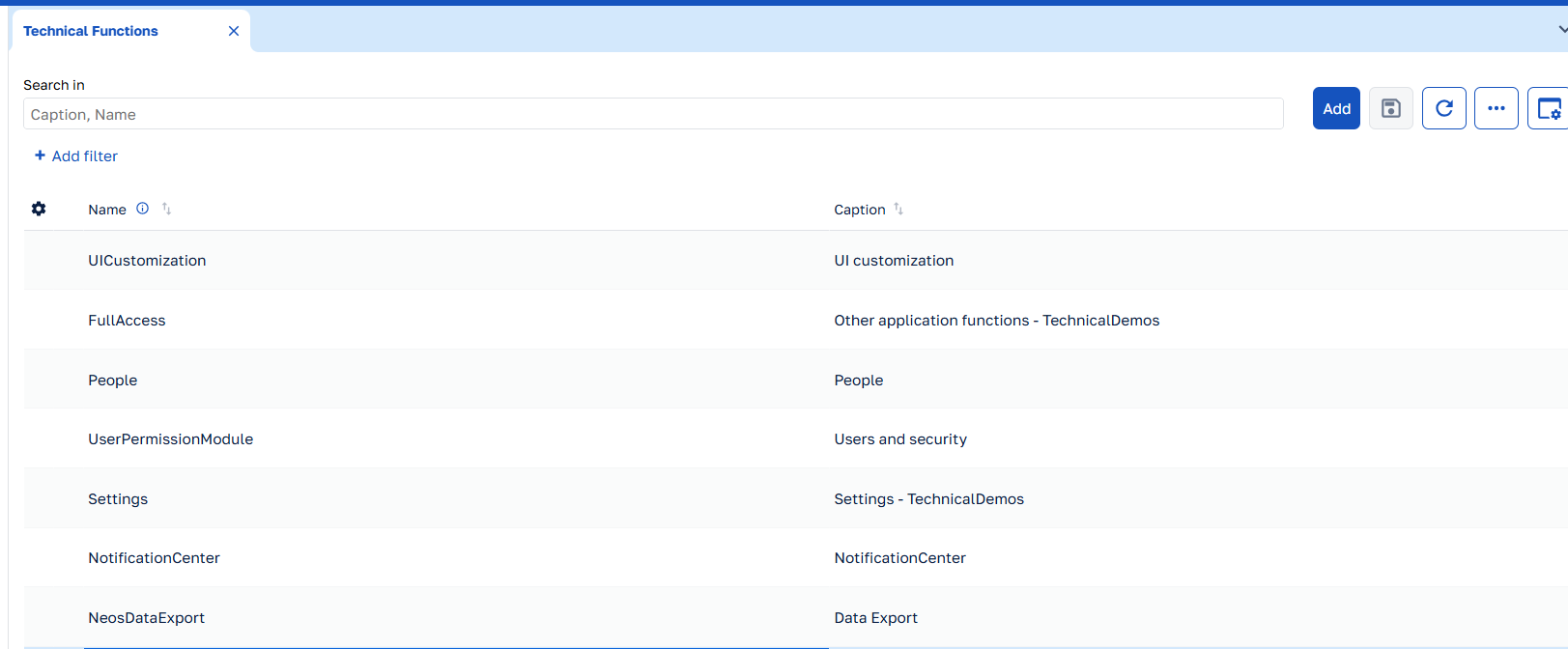
Each technical function is corresponding to function from the clusters.
Here an example of the functions from TechnicalDemos
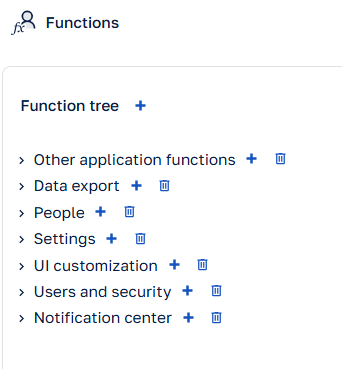
The most important information is to create the technical function with the same name as the cluster function. Be careful with character case. In the example below, the important information from the function "Les autres fonctionnalités" is the name "FullAccess".

Then here how is should be into the License Management :
2. Metrics
Metrics allow you to define measurable constraints for your licenses. These are typically thresholds or quotas that limit usage.
- Code: A unique identifier for the metric (e.g., "MaxUsers")
- Name: A descriptive name (e.g., "Maximum Number of Users")
- DataType: Choose between integer and boolean
- Is Blocking: Determine if exceeding this metric should block functionality
Remember to use standard codes for Neos-provided metrics as described in the "Metrics delivered by Neos" section.
3. Features
Features represent business functionalities that will be available to end users.
- Name: The name of the feature (e.g., "Data Exports")
- Technical Functions: Associate one or more technical functions to this feature
4. Commercial modules
Commercial modules group related features into marketable packages.
- Name: The name of your module (e.g., "Core")
- Features: Select the features included in this module
- Metrics: Associate any relevant metrics that apply to this module
5. Commercial solutions
Commercial solutions are the product offerings that will be sold to clients, composed of one or more modules.
To configure commercial solutions:
- Navigate to the Solutions section
- Click "Add Solution"
- Complete the form:
- Name: The solution name (e.g., "MRoad")
- Version: The solution Version (e.g., "Start, Premium")
- Modules: Select the modules included in this solution
Since version 2.4, it is now possible to define default values for the metrics associated with commercial modules. This makes it possible to retrieve this value when a license is created. Note that the value can be redefined.
6. Customers
It's recommended to name the customers like their Tenant's name.
- Code: The customer's code
- Name: The customer's name
7. Licenses
Licenses connect commercial solutions to specific customers and define the values from the commercial solutions's metrics.
- Customer: Select the customer this license applies to
- Solution: Choose the commercial solution
- Metrics Values: Set specific values for each metric included in the solution. Since 2.4, by default, these values are taken from the commercial solution, but they can be overridden here. An indicator shows if the value is overridden or not. If so, it can be reset to the default value by clicking on this indicator.
- Status: Set to "Active" to make the license available
Once a customer and their license are configured, you can assign the license to the appropriate tenant as described in the next section.
How to affect a license to a tenant ?
In development, start your cluster with neos run -mt -l
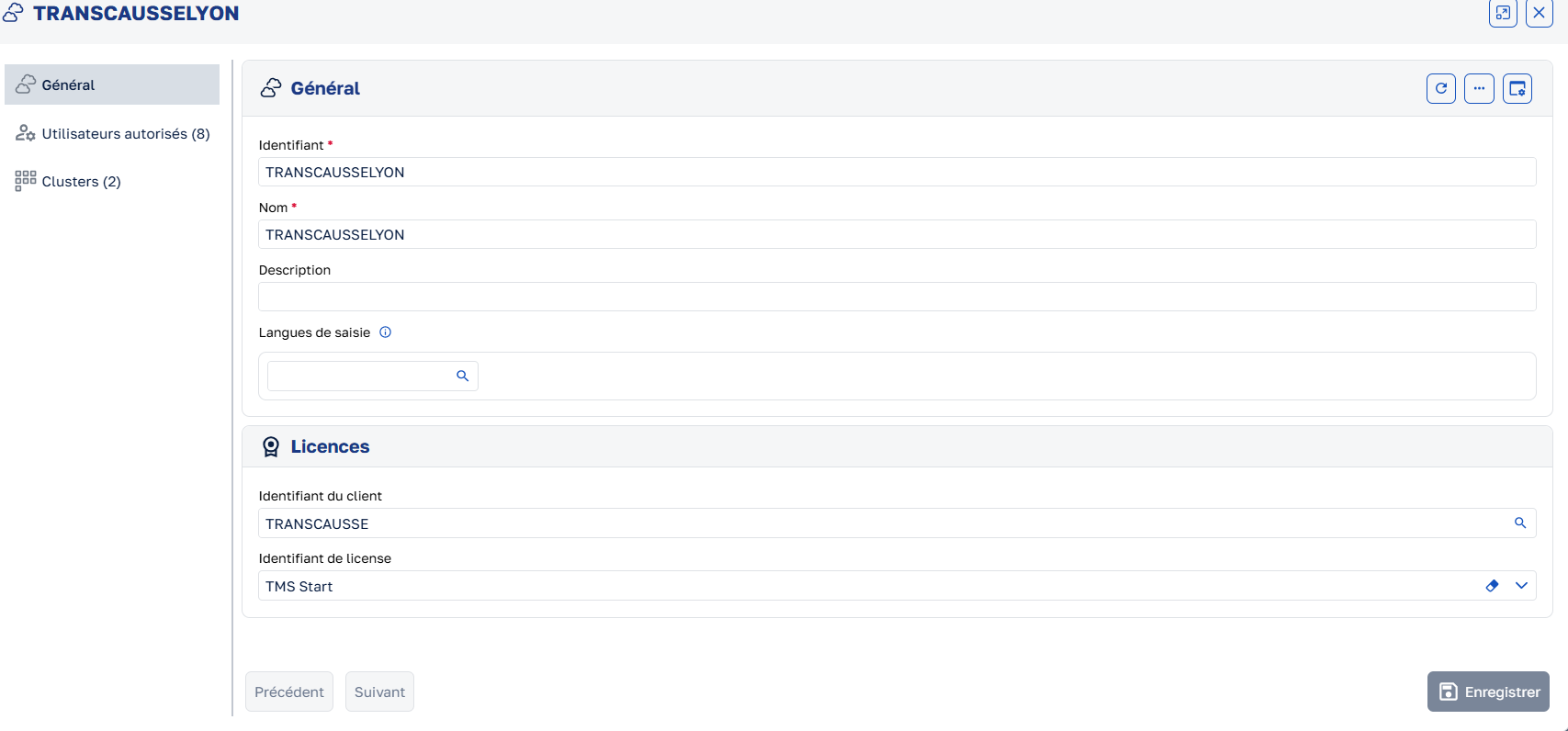
Once your license is created, go to the Tenant Management in the tenant's page. Select and open the tenant you want to affect the license to. Then in the license section, select the customer and then the license.
Vocabulary
Each "license detail" implements a so-called "metric".
A "metric" needs to be configured in the License Management cluster settings: it is the description of metric that will be verified in the business code. It has a unique codename.
A retrieved LicenseDetail record holds:
- a main
Valueproperty (which is an integer but which may stand for a boolean providing it is restricted to the binary values 0 or 1) - and an
IsBlockingproperty that the business code can use as a severity flag.
Metrics delivered by Neos
Neos provides predefined metrics that you can use out of the box. To use them, you need to create a metric and set its code with one of the following metric codes (the caption does not matter).
List of the metrics:
Code: $NeosQuotaOnUserCreation
Use: Determines the number of users that can be created in a tenant.
Effect: Triggers an error if the number of users created is greater than the number of users allowed.
API
License identifier associated with the tenant
The (nullable!) license identifier can be retrieved in business code by injecting a TenantInfoAccessor service and using:
int? licenseId = _tenantInfoAccessor.NeosTenantInfo?.LicenseId;
License metric (AKA. quota, threshold, Volumetry, etc.)
A LicenseVolumetry record can be retrieved in business code by injecting ILicenses and using FindCurrentLicenseVolumetry method (or FindLicenseVolumetry method).
Please remember that license metric are identified by unique codenames (e.g. the implemented native "$NeosQuotaOnUserCreation" in the UserPermissions module).