v2.3.14
Published on Jan 12, 2026.
Fixes
- Fixed Helm chart Dapr sidecars version which is now explicitly configured to match the SDK version used by the ecosystem. (15354)
- Added
daprVersionparameter support in Helm chart, enabling proper Dapr sidecar version alignment when deploying clusters with previous versions. See the documentation for more details. (15354)
v2.3.13
Published on Dec 10, 2025.
Fixes
v2.3.12
Published on Nov 19, 2025.
Fixes
- [UserPermissions] Fixed cluster roles not being visible in other clusters when the UserPermissions module was an indirect cluster dependency. (14914), closes 30374
v2.3.11
Published on Nov 12, 2025.
Features
- Updated Stimulsoft library from version 2025.3.5 to version 2025.4.2 (fixes saving changes after performing the Undo command in the Designer). (14719)
Fixes
- [User Permissions] Fixed roles cache not updated correctly for tenants on separate database. (14776), closes 29839
v2.3.10
Published on Oct 20, 2025.
Fixes
- [Security] Fixed CVE-2025-55315 (CVSS CRITICAL 9.9). Please update your backend / task-runner docker images to use at least ASP.NET Core Runtime version
8.0.21(see this article for backend and this article for task-runner). (14581), closes 29701
v2.3.9
Published on Sep 25, 2025.
Fixes
- [Helm] Changed Redis bitnami images reposity to use legacy images. Please see this article for more details on Bitnami's policy change regarding its Docker images. (14315)
- [UICustomization] Disabled a pre-validation rule temporarily to avoid an error when editing a custom view. (14205), closes 27746
- Updated Stimulsoft library from version 2025.3.4 to version 2025.3.5 (fixes an error when trying to use the Undo feature in the Stimulsoft Designer). (14152), closes 28679
v2.3.8
Published on Sep 05, 2025.
Features
- Added a cache to improve invalidation of lookup properties to reduce the number of API calls. (13969)
Fixes
- [Reporting] (Backward compatibility) Fixed the CSV export feature provided by the Reporting service to be able to work with requests emitted from Business clusters based on Neos v2.2. (14101), closes 28747
- Fixed the position of the datagrid floating bar when actions have conditional visibility. (14035), closes 28638
- [Neos Studio] Fixed issue on data table edit UI that could execute many API requests to invalidate lookup values. (13969)
- Fixed filter serialization with Invariant Date/Time value. (13963), closes 28318
v2.3.7
Published on Aug 22, 2025.
Features
- Updated Stimulsoft library from version 2025.2.5 to version 2025.3.3. (13803)
Fixes
- [User Permissions] Fixed user roles cache not being updated correctly (race condition when starting multiple backends simultaneously). (13880), closes 28003
- [User Permissions] Fixed user permissions display on the user account list UI. (13927), closes 28248
- [User Permissions] Fixed loading of
DefaultAllowedFunctionssettings (13925), closes 28475 - [User Permissions] Fixed current permission reset when changing role. (13926), closes 28322
- Fixed the z-index of the button which was conflicting with the frozen columns of datagrid. (13792)
v2.3.6
Published on Jul 30, 2025.
Fixes
- Fixed reactivity of the summary row when a property of a item loaded from the server changes. (13759), closes 28216
- Fixed Jeager installation in
neos setupcommand. (13750), closes 27306 - Fixed custom views of the lookup modal to prevent saving the user's filter. (13632), closes 27392
v2.3.5
Published on Jul 17, 2025.
Fixes
- Fixed UI runtime warnings when a
contextelement is inside arepeat. (13605), closes 27924 - Added missing tooltip on datagrid column headers. (13594)
- Fixed
Could not load file or assembly 'Microsoft.CodeAnalysis, ...'error on generation in Neos Studio. (13595), closes 27687 - Improved client-side quick search algorithm. (13558), closes 27512
- Fixed parameter loss occurring when renaming a UI method. (13528), closes 27720
v2.3.4
Published on Jul 03, 2025.
Fixes
- Pinned version of the sub-dependency
@primeuix/stylesto prevent visuals regressions. (13516), closes 27714 - Fixed viewer behavior with regards to dashboard usage : 1. fixes the refresh capability in the viewer, 2. fixes use of buttons (as long as they have explicit styles for their "checked", "hover" and "pressed" states (in which case the Viewer and the default font loading mode
ReportingFontsLoadingMode.Embedshould work). (13510), closes 27497, 27554 - Fixed datagrid detail row height calculation. (13503), closes 27254
v2.3.3
Published on Jul 01, 2025.
Features
- Improved error handling in interservice calls to enable retrieval of detailed error information. See documentation. (13465)
- Updated Stimulsoft library from version 2025.1.4 to version 2025.2.5. (13400)
Fixes
- Updated
primevuedependency. You can remove the following section from the cluster configuration:ClientDependencyOverrides: '@primeuix/styles': 1.1.1
More details : 13480
- Fixed handling of manually entered exact values in the lookup field (in "Starts With" and "Quick Search" search modes). (13471), closes 27071
- [UserPermissions] Fixed permissions tree refresh when selecting a role. (13458), closes 27353
- Fixed execution of a validation rule dependent on multiple source elements that was running on the first element regardless of which element was modified. (13419), closes 27207
- Fixed datagrid column auto resizing to occur on the initial data load when data loading on open is disabled (without requiring
resize-columns-on-refreshto be set totrue). (13403) - Improved datagrid performance when
resize-columns-on-refreshistrueto automatically resize only when the data source has changed. (13403), closes 27556 - Improved performance during position changes in UI with large data sources. (13398)
- Fixed input of min and max values defined as expressions in the UI view properties. (13394), closes 26915
v2.3.2
Published on Jun 19, 2025.
Features
- Added
RadioGroupcomponent attributes in the theme. (13338) - Added
ClientDependencyOverridessection to the cluster configuration file to generate theoverridesfield in clientpackage.jsonfile for managing sub-dependency breaking changes. (13313)
Fixes
- Fixed "More filters" button visibility in the "Add filter" button dropdown menu when there are no more filters. (13320), closes 27380
- Fixed calling of overridden UI view event rule which uses the arguments. (13318), closes 27434
- Fixed display of the country flags in the UserPermissions and the DataExchange modules (regressions 2.3.0). (13321), closes 27382
- Fixed display of features, indexes and foreign keys in Neos Studio treeview. (13289), closes 27284
- Fixed duplicate database migration history in Tenant Management. (13269), closes 27168
- Fixed the AllAsync and AnyAsync extension methods provided by the framework. The this keyword was missing in their definitions, which prevented them from being used as proper extension methods. (13264), closes 27318
- Fixed report viewer crash regression when refreshing or navigating a browser window with an opened "by code" report viewer tab that has the focus : the viewer in the reloaded tab would show an error 500. (13253), closes 27244
v2.3.1
Published on Jun 10, 2025.
Fixes
- Fixed resources in the NeosCore module that were not linked to any function. (13218), closes 27263
- Fixed client-side code generation when a visibility condition is set on the root element of a UIView template. (13217), closes 27258
v2.3.0
Published on Jun 03, 2025.
Key insights
Welcome to the 2.3 release of Neos. There are many updates in this version that we hope you'll like, some of the key highlights include:
- New
disposedevent on UI view - New UI view action locations
- New components
- Datagrid improvements
- Server data export improvement
- Rich text editor improvements
- Multi-root UI template
- Overrides default template of header and footer of a UI view modal
- Improved control over entity view property exposure in APIs
- New auto load property on SubUIViews
- NuGet package relocation of business assembly test projects
- AI
- Tenant-specific module
- Stimulsoft reports portability and interoperability
New disposed event on UI view
A new type of event has been added to UI view: disposed. To see more about it, see the documentation.
New UI view action locations
There are two new locations of UI view action:
- Datagrid row: The action will be visible in a floating bar above the row of datagrid.
- Datagrid footer: The action will be visible in the footer of datagrid.
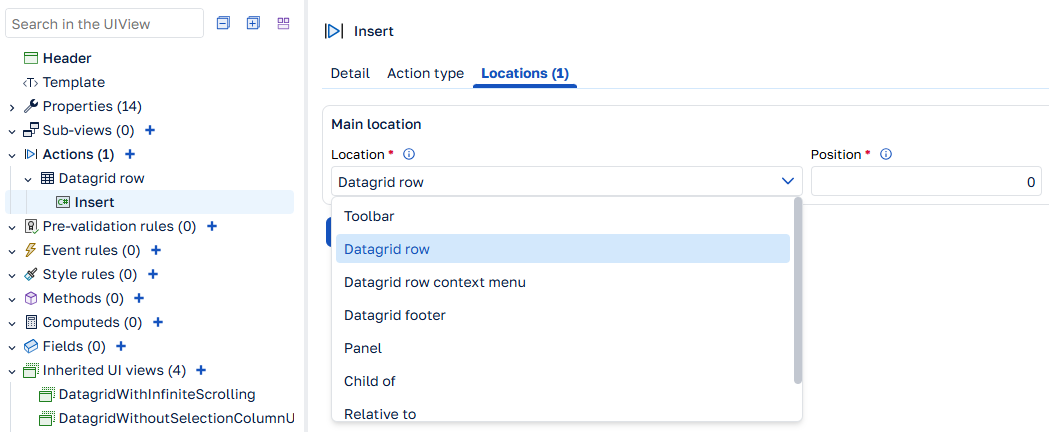
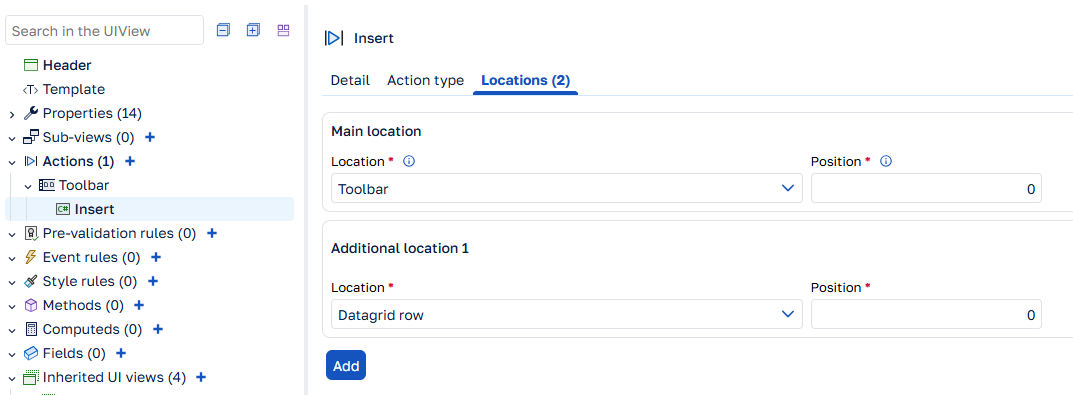
Also, you can now define multiple locations on the same action.
New components
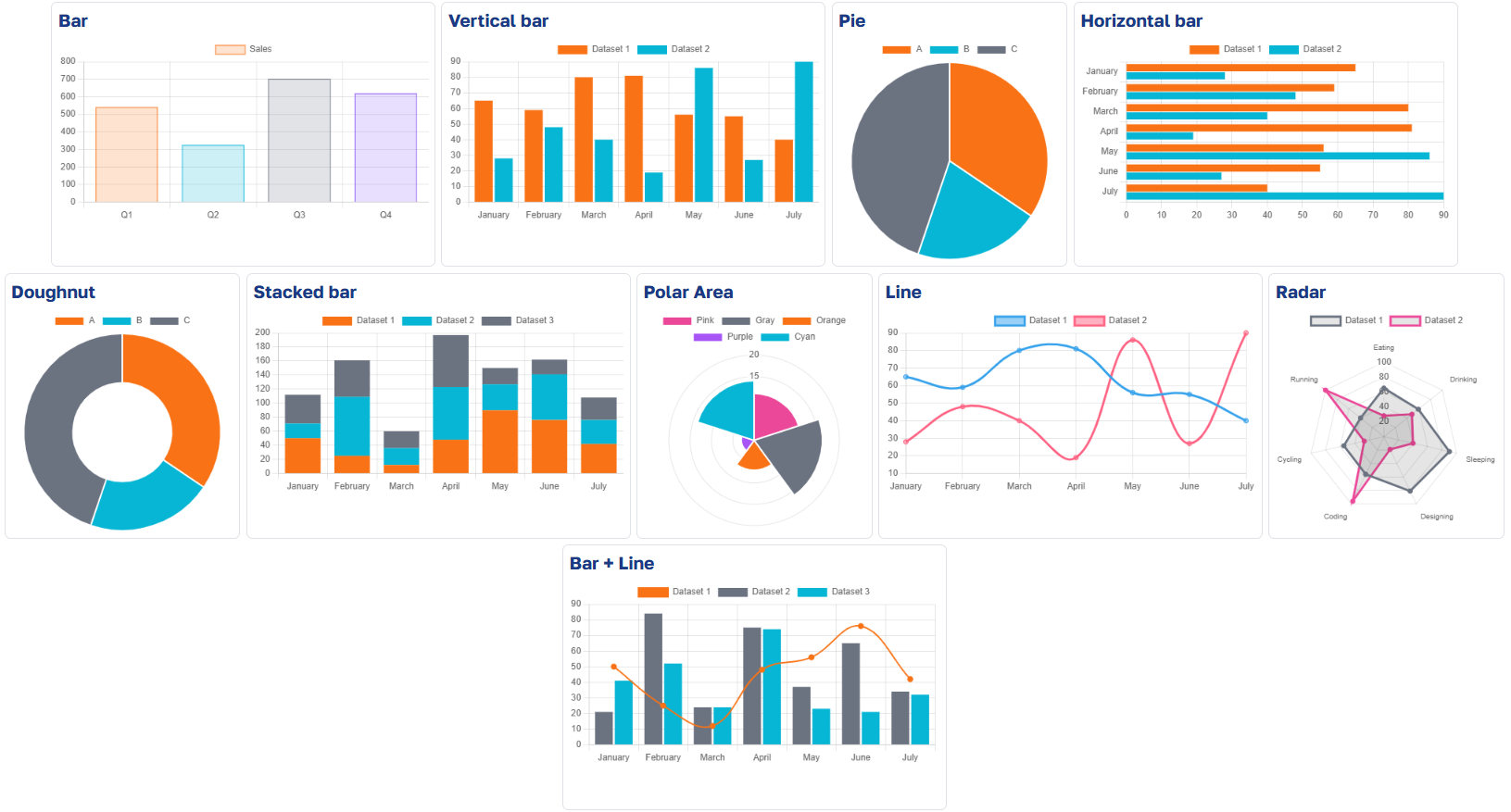
Chart
The chart component has been added.
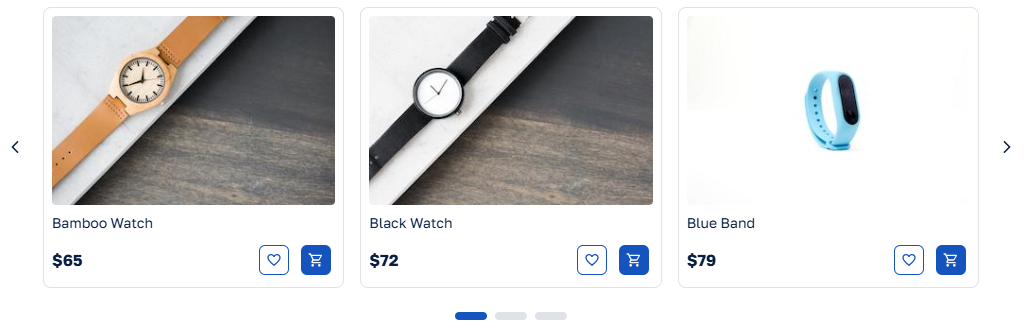
Carousel
The carousel component has been added.
Progress bar
The progress bar component has been added.

Combobox select-button display mode
A select-button display mode has been added to the combobox.

Avatar
The avatar component has been added.
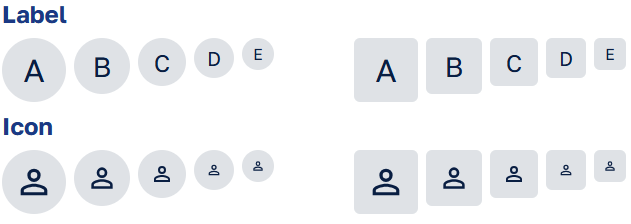
Datagrid improvements
Row drag & drop
It is now possible to enable row drag & drop by setting the row-drop attribute. See the row drag and drop documentation.
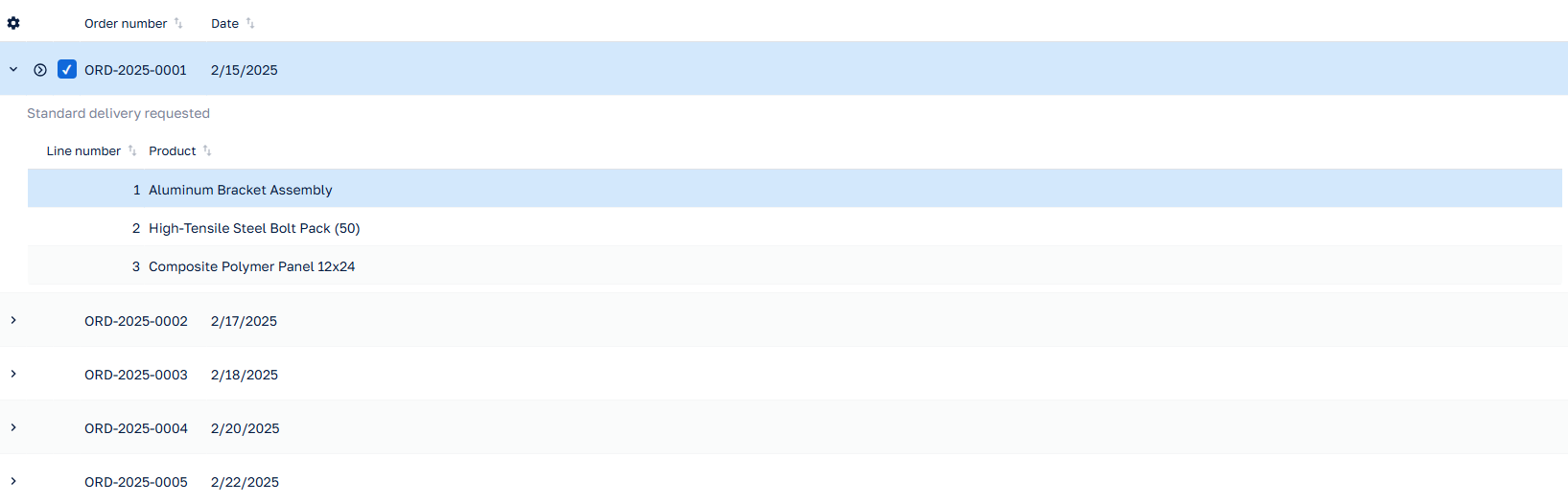
Row detail
It is now possible to add a detail to each row. You can enable it using the <row-detail-template> node.
Hide indicator column
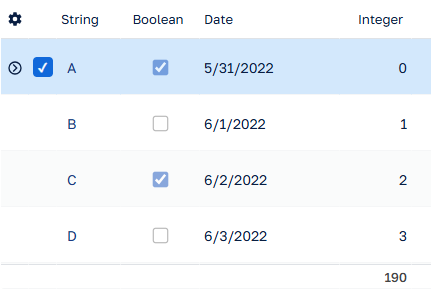
You can now hide the indicator column by setting the indicator-column attribute to false on the datagrid. This can be great for saving space, especially on a read-only grid.
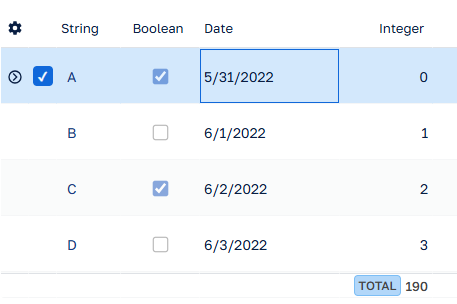
Hide or modify tag of summary types
You can now hide or modify tag of summary types in several ways. See summaries documentation.
Server data export improvement
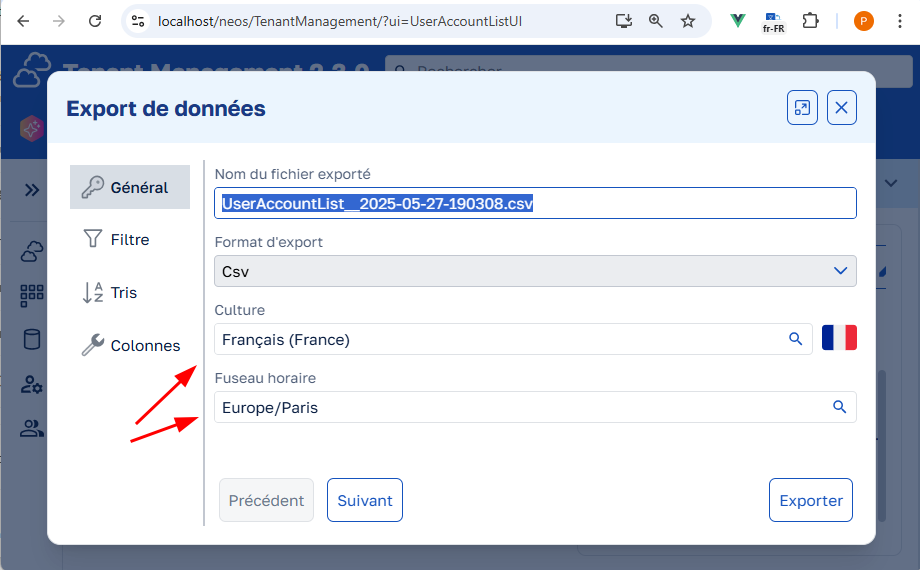
The default export will be performed according to the client user settings provided by the operating system and/or the browser, in particular:
- in their language and culture
- for their time-zone (since v2.3).
The form on the "General" tab of the NeosDataExportUI in the "NeosDataExchange" module is pre-filled accordingly:
Documentation:
Rich text editor improvements
Custom actions
It is now possible to add your own buttons in the toolbar of the rich-text-editor component using attribute custom-actions.
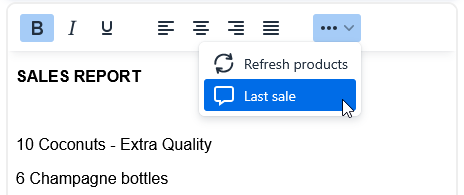
See the documentation for more information.
Speech-to-text
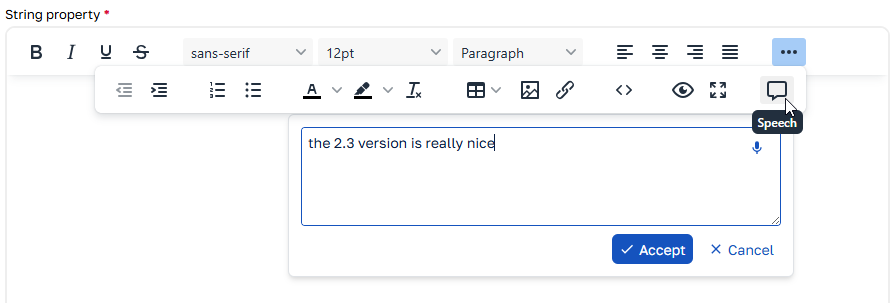
Speech-to-text is now integrated by default in the toolbar of the rich-text-editor component (value speech in the toolbar attribute of the component). You can use it to insert text at the current cursor position or to replace the selected text.
The button is only visible in web browsers that support speech-to-text (Chromium-based browsers for example).
AI writing assistant
Module NeosAICore now provides a new rich text editor UI component enriched with an AI writing assistant.
Provided you reference the module in your cluster, you can add the component in your templates using the <neos-ai-rich-text-editor> tag.
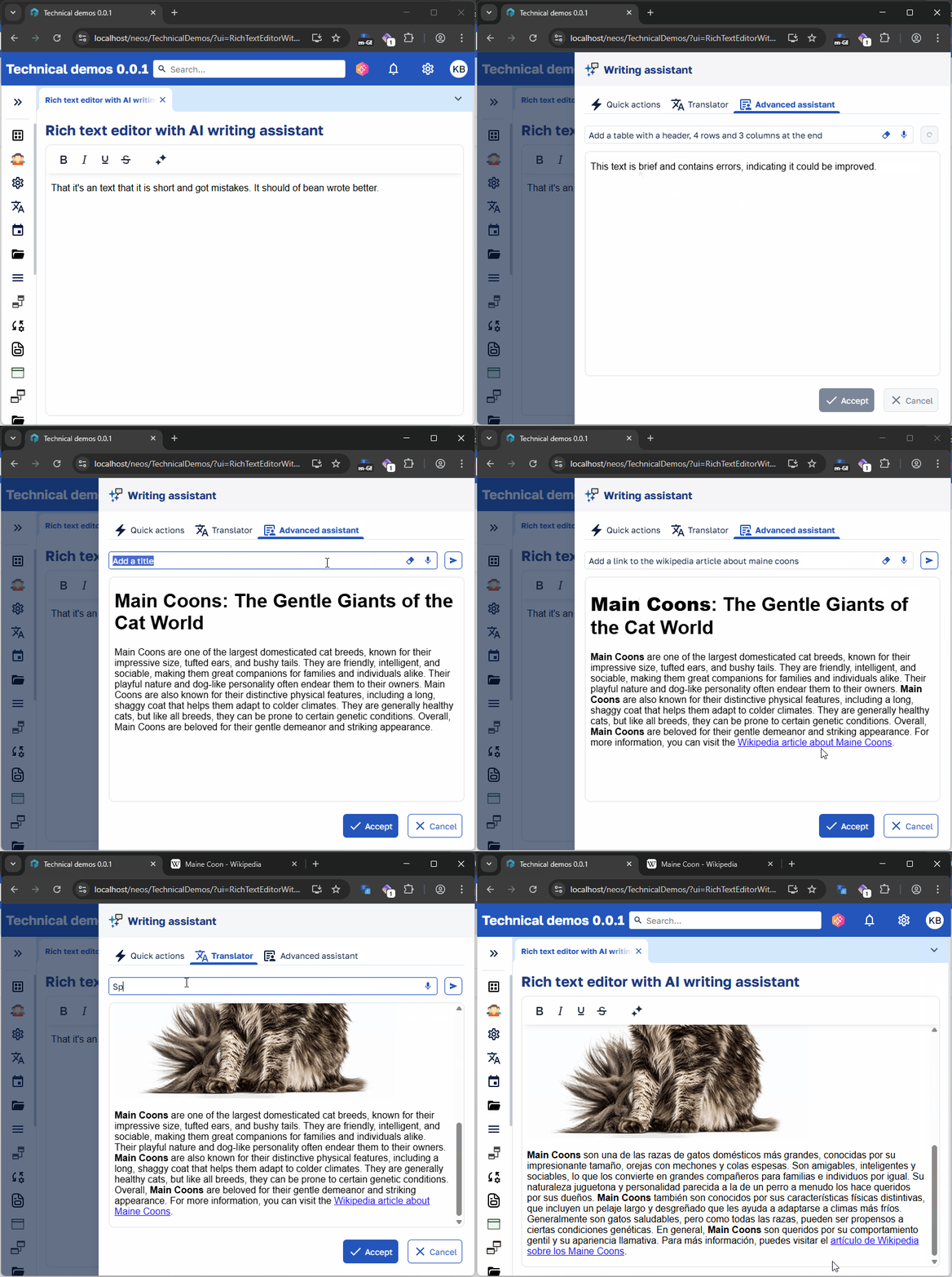
See the documentation for more information.
The AI writing assistant can be used on its own.
See the documentation for more information.
Multi-root UI template
Before version 2.3, only one root element had to be defined in UI template. Now there's no such limitation. The following template is now valid:
<toolbar />
<datagrid />
<pagination-bar />
Overrides default template of header and footer of a UI view modal
It is now possible to define the template that will be displayed in the header and footer of a UI view's modal. Example:
<!-- Header -->
<template-modal-header>
    <horizontal-layout align="space-between" vertical-align="center" wrap="false" layout:width="fill">
        <heading>@Title</heading>
        <toolbar layout:width="fill" />
    </horizontal-layout>
</template-modal-header>

<!-- Body -->
<vertical-layout layout:padding="small" layout:height="fill">
    <datagrid layout:height="fill" />
</vertical-layout>

<!-- Footer -->
<template-modal-footer>
    <horizontal-layout align="right" layout:width="fill">
        <button type="action" name="Cancel" />
        <button type="save" />
    </horizontal-layout>
</template-modal-footer>
If the UI view is not opened as a modal, the template-modal-header and template-modal-footer will be ignored.
Improved control over entity view property exposure in APIs
Two new options, Exposed in GET and Load on GET, are now available for entity view properties.
These options allow you to:
- Enable filtering on collections without loading them, giving users more powerful filtering capabilities without compromising performance.
- Hide properties from the API that are only needed for internal business logic execution.
See the documentation for more information.
New auto load property on SubUIViews
This new option allows you to prevent a non-embedded collection from being automatically loaded in a screen. Instead, you can load it manually only when needed—for example, when a specific tab is activated:
await SubViews.Addresses.EnsureDataLoadedAsync();
See the documentation for more information.
Additionally, collections are no longer required in PUT requests on the server side. Omitting them or sending null has no effect on existing data. To reduce payload size, the client no longer sends collections that are either unchanged or not loaded. See the documentation for more information.
NuGet package relocation of business assembly test projects
We moved some NuGet package references from .csproj files of business assembly test projects to generated .props files to facilitate Neos version upgrades.
You can remove the following packages from .csproj files of business assembly test projects:
- Microsoft.Extensions.DependencyInjection
- Microsoft.NET.Test.Sdk
- xunit
- xunit.runner.visualstudio
- FluentAssertions
- Moq.AutoMock
- Microsoft.Extensions.Logging.Abstractions
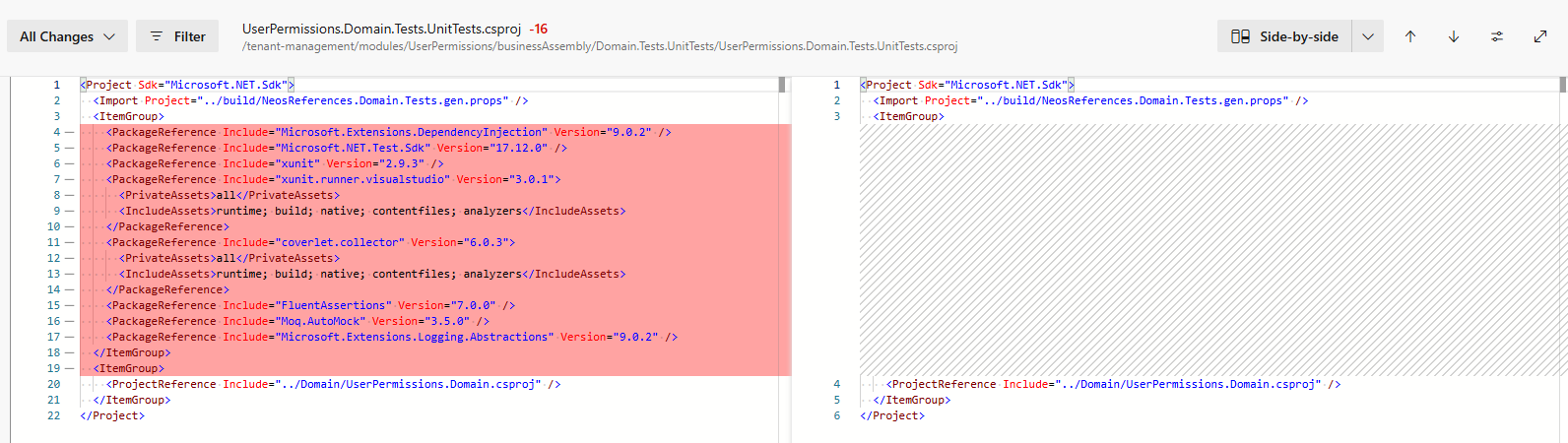
We've updated most of our C# dependencies, including the Microsoft.Extensions.* packages from version 8.x to version 9.x. You may need to do the same for your business assemblies if these packages are referenced in your projects.
AI
Cluster
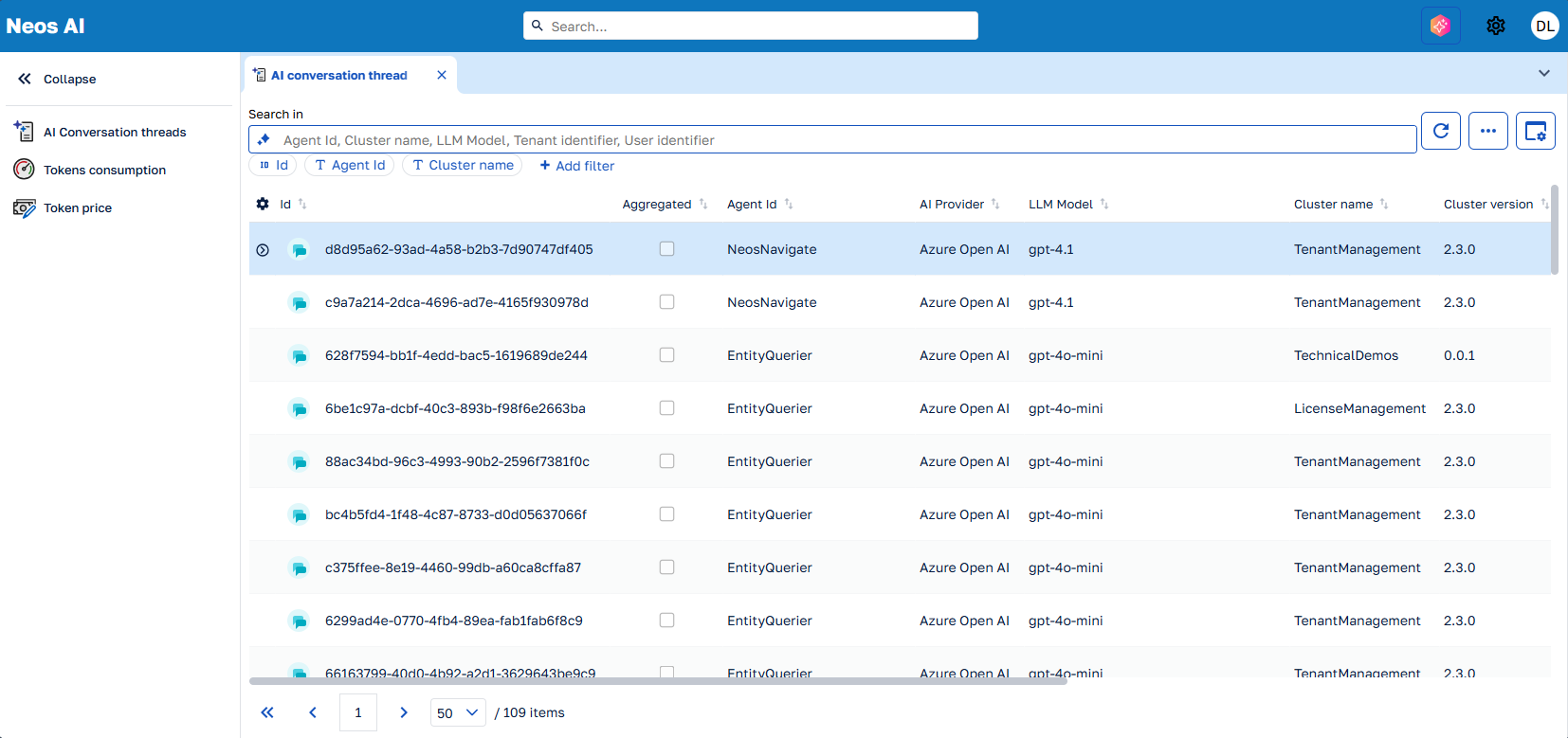
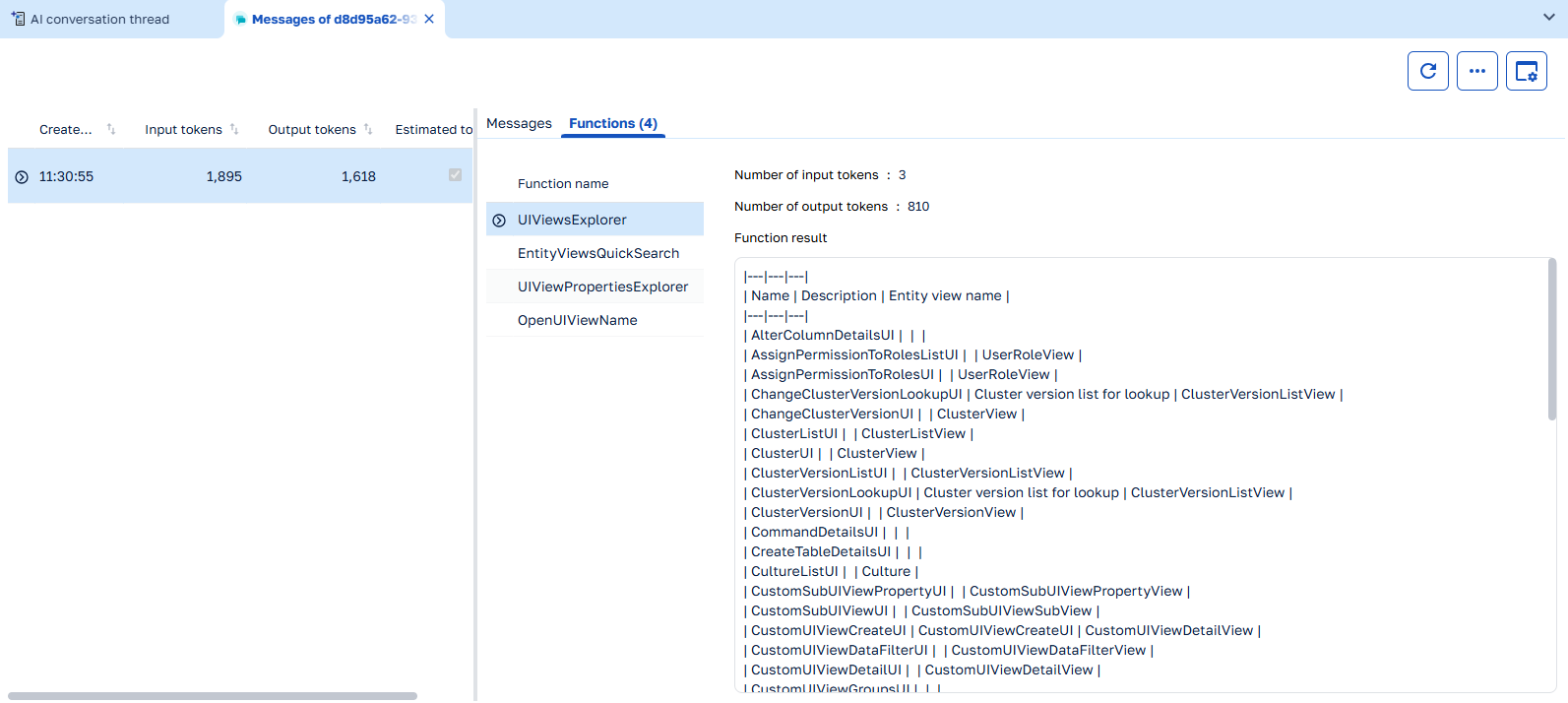
A new cluster Neos AI has been added to the framework. This cluster provides a module NeosAICore that contains the LLM settings, common agents, and the AI writing assistant.
This cluster can be deployed in production to monitor the token usage of the AI agents by tenants.
It is also useful for development purposes, as it provides detailed log of the AI agents activity.
Treads list
Thread detail
Token consumptions
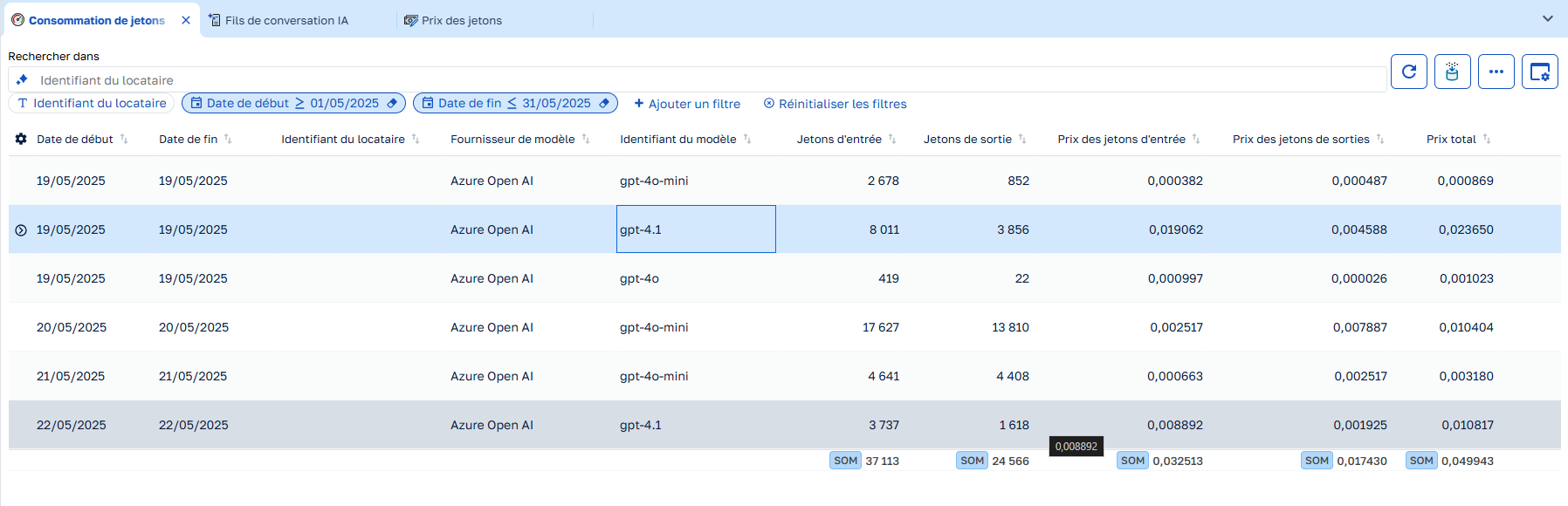
See the NeosAiCore module and Neos AI Cluster for more information.
Agent evaluation
It is now possible to evaluate the performance of an AI agent by creating an xUnit test project.
 [Fact]
 public async Task ShouldAnswer_To_HowManyDataObject()
 {
     // Arrange
     _dataObjectRepositoryMock
           .Setup(x => x.GetQuery())
           .Returns(new[] { new DataObject { Name = "D1" }, new DataObject { Name = "D2" } }.AsQueryable());
     AIEvaluationOptions options = new AIEvaluationOptions(
         "How many dataObject?",
         "There are 2 dataobjects."
     ).WithEvaluator(AIEvaluator.Groundedness);

     // Act
     EvaluationResult evalResult = await EvaluateAsync<EntityExplorerAgent>(options, CancellationToken.None);

     // Assert
     NumericMetric groundedness = evalResult.Get<NumericMetric>(GroundednessEvaluator.GroundednessMetricName);
     groundedness.Interpretation!.Failed.Should().BeFalse(groundedness.Reason);
 }
See the documentation for more information.
Tenant-specific module
You can now create a module that is specific to a tenant. This module can override the metadata of a parent module, but only some metadata can be overridden. On runtime, the tenant overrides will be applied only for the tenant that owns the module.
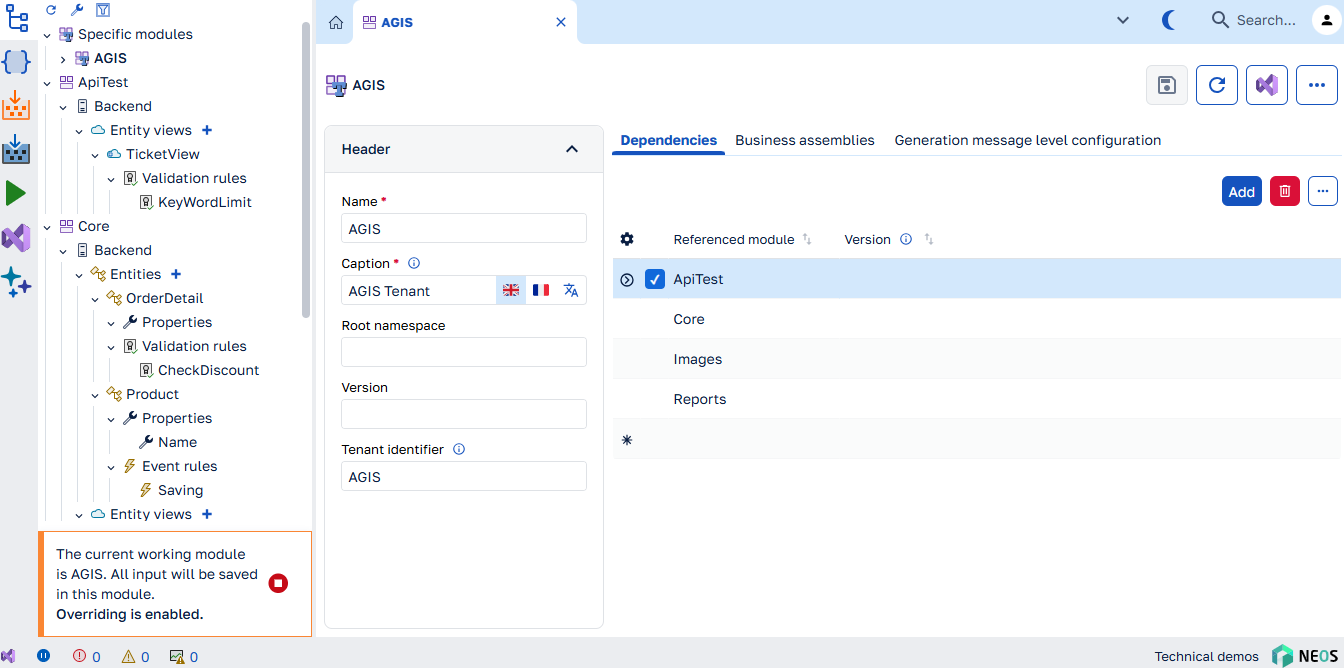
See the documentation for more information about the tenant-specific modules.
Stimulsoft reports portability and interoperability
For usages such as:
- sending a report as a bug illustration to Stimulsoft
- or opening a Neos report in the Stimulsoft desktop application,
it is now possible to export a standalone version of the Neos reports.
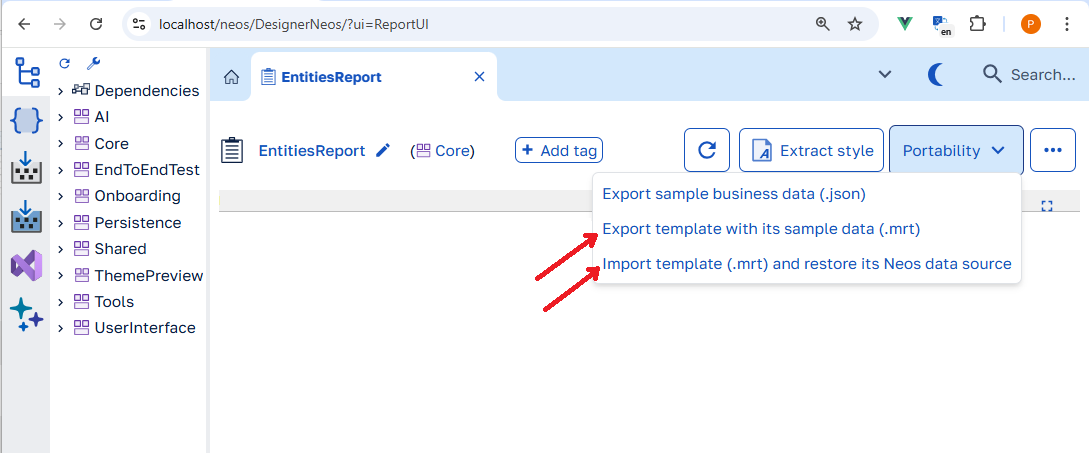
During this process, the online Neos database (AKA. entity-view endpoint) is replaced by an offline JSON database pointing at an embedded resource and the Neos Designer performs the opposite operation upon import and replaces back the offline Json data by a connection to the live endpoint in the business cluster.
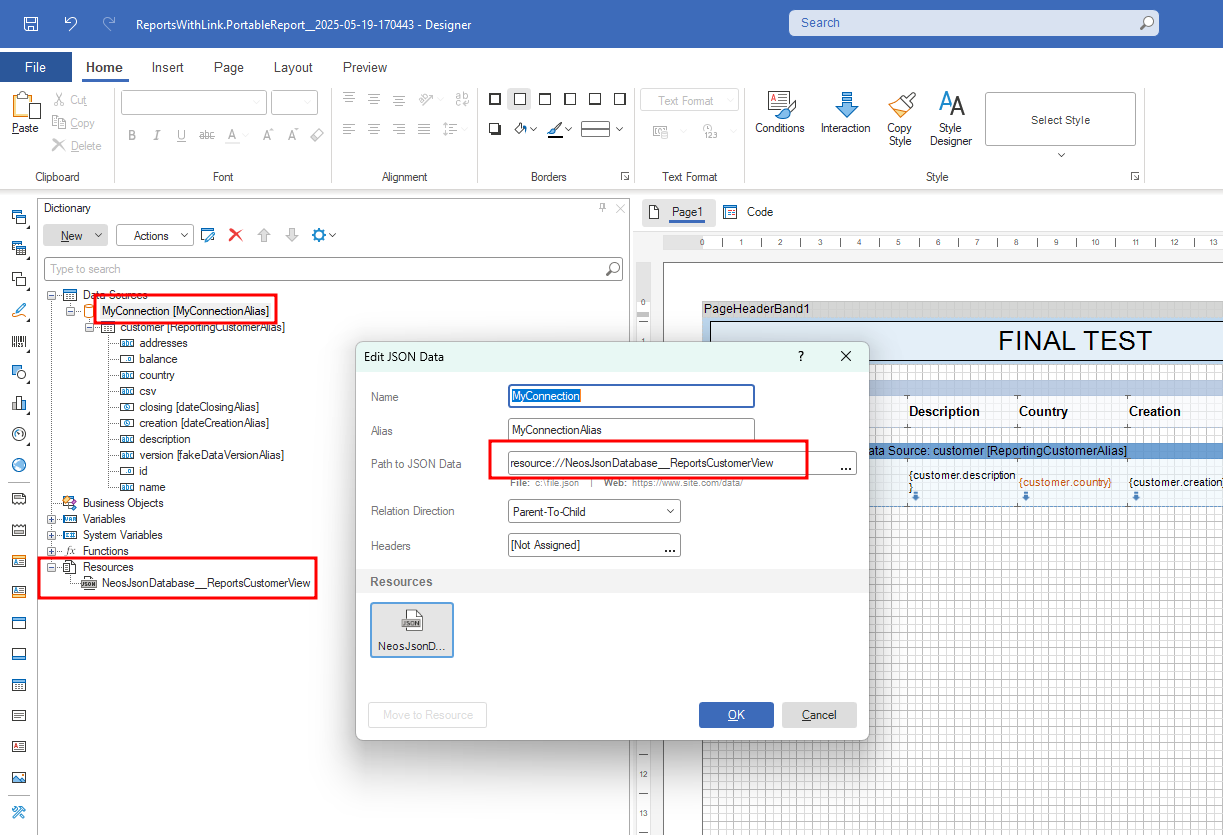
Documentation: Offline Neos database and report portability.
Breaking changes
- Marked
full-heightattribute of thehorizontal-layoutas obsolete. Uselayout:height="fill"directive instead. (13083) - Changed sort order in lookup suggestion when the filter operator is
containsor user input wildcards at beginning and end of text. Suggestions starting with the input text are now displayed first. (12939) - In E2E tests, IDatagridComponent.GetActiveCell now returns a non-nullable result. If no cell becomes active within 30 seconds, it now throws an exception instead of returning null. (12831)
- To check whether there is no active cell, use IDatagridComponent.HasActiveCell, which returns immediately without waiting. (12831)
- Marked methods that accept a parameter of type
AdditionalDataExpressionsin theIEntityViewRepository<{TEntityView}>interface as obsolete. You should now set additional data expressions by calling theSetUIViewNamemethod on theIEntityViewRepositoryContext<TEntityView>interface before using the entity view repository. (12526) - Helm : Application Insights
instrumentationKeySecretfor sending Dapr telemetry is deprecated by 31 March 2025, please useconnectionStringSecretinstead. Please see this article. (12433) - Moved NuGet package references from
csprojfiles of business assembly test projects to generatedpropsfiles to facilitate Neos version upgrades. The following packages no longer need to be referenced:Microsoft.Extensions.DependencyInjection,Microsoft.NET.Test.Sdk,xunit,xunit.runner.visualstudio,FluentAssertions,Moq.AutoMock,Microsoft.Extensions.Logging.Abstractions. (12287) - Removed LLamaSharp AI connector (too low-level and not recommended for a production environment). (12236)
- Updated Microsoft.Extensions.* package from 8.x.x to 9.x.x. (12236)
- Updated System.Text.Json package (8.0.5 -> 9.0.2). (12236)
- The interface
GroupeIsa.Neos.Application.AI.Chatbot.IChatBotInterceptoris marked obsolete, use theGroupeIsa.Neos.Application.AI.Interceptor.IAgentInterceptor. (11983)
Features
- Added a new AI agent
Gaiato create data. (13161) - Added tooltip in the datagrid footer to display the number of loaded items when infinite scroll is enabled. (13139)
- Added
CultureandTimeZoneoptions to the server data export UI provided by theNeosDataExportUI. It is configured to pre-fill the export form with the culture and time-zone of the client navigator on the "General" tab. (13115) - Added
FilterBarDisplayModeoption inUIDefaultBehaviorconfiguration section of the cluster to be able to defines the default display mode of thefilter-bar. (13099) - Added
Textaction display mode. (13112) - Added
advanced-modeattribute onfilter-barcomponent to be able to disable advanced mode. (13102) - [Neos Studio] Added filtering of entity, entity view and UI view properties via the search input above the tree view. (13097)
- Added toggle of action button dropdown via keyboard shortcut. (13095)
- Added
SortPropertyon UI view properties. See documentation. (13084) - Added capability to hide technical or irrelevant functions/permissions by using a code expression. (13022)
- Added support for image file overriding. (13055)
- Added transpilations for some System.String symbols not yet transpiled. (13067)
- Added
Placeholdermetadata documentation and changed caption in french. (13044) - Added the ability to use a specific pubsub message broker using Helm. See this article. (13011)
- Added comboboxes to select the properties to link to the key properties of a referenced entity. You can still write the name of a property that does not exist, it will automatically be created when saving. (13051)
- Added the ability to publish a pub/sub message without the Neos envelope. (13052)
- Added a specific popup to change the tenant identifier. The tenant identifier cannot be directly modified in the UI view of tenant editing. (13032)
- Added a new
Database migratingstate when a database migration is started. (13018) - Added Querya agent in NeosAICore module. (13021)
- Added chabot in license management and tenant management clusters. (13021)
- Added confirmation message before executing on cross-cluster user accounts synchronization. (13023)
- [Neos AI] Added a new agent for navigating in natural language. (12863)
- Added
LoadMoreDataAsync()method to theViewModelto load more data from the server and append it to the datasource, similar to what the infinite scrolling of the datagrid does. (13026) - Added speech-to-text in the
rich-text-editorcomponent. (13008) - Added
chartcomponent. (13009) - Increased tenant identifier size to support GUID (36 characters) and added a action to create new GUID for the tenant identifier. (13007)
- Added "Export template with sample business data" and "Import template (.mrt) and restore its Neos data source" actions in the designer for exporting/importing a Stimulsoft .mrt file with an embedded .json resource acting as an offline Neos database. (12910)
- Added an
Auto loadproperty on SubUIViews. See documentation. (13006) - Added
progress-barcomponent. (12975) - Added white space handling for localizable string. (12958)
- Added automatic tenant user accounts synchronization when adding a new cluster in tenant management. (12986)
- Added
select-buttondisplay mode on thecomboboxcomponent. (12962) - Added
avatarcomponent. (12960) - [Report Viewer] By default, any fonts used in the report that are installed on the report server will be automatically embedded in the report for display in the viewer when the report is generated. See this article. (12917)
- Added images, string resources, UI packages and report styles items in Neos Studio Treeview. (12893)
- Added IViewModel.CurrentId property to access the value of the current element's identifiers when opening a UI. (12893)
- Added cross-clusters user accounts synchronization feature with tenant management. (12928)
- Added
carouselcomponent. (12946) - Added new IResourceLocker.WaitForLockAsync method to wait for the acquisition of a distributed lock. (12943)
- Added partial transpilation of the
System.TimeZoneInfoclass. (12913) - [Neos Studio] Added filter bar in data table columns, entity properties, entity view properties and UI view properties. (12920)
- Added short texts for UI validation messages displayed below input fields. (12911)
- Added a setter to the
Iconproperty of the UI view ViewModel. (12914) - Added an "Export sample business data" button in the designer for exporting a JSON file with the data equivalent to the Neos Datasource used by the Stimulsoft report. (12820)
- Added the ability to deploy a specific actor state store using Helm. See this article. (11954)
- Added the ability to create partial classes for entities in Neos Studio. See documentation. (12855)
- Improved the entity view APIs by making collections optional in PUT requests. To clear a collection, an empty array must now be explicitly provided. If a collection property is omitted or set to null, it will remain unchanged. (12887)
- Added
Server-side read onlysupport on collections in entity views. (12878) - Added the ability to define
annotationsproperties in Helm values to customize deployed pods for report server, cluster backend, cluster frontend and cluster task-runner. (12877) - Added
Filterablesupport on collections and references in entity views. (12864) - Added two new options,
Exposed in GETandLoad on GET, on entity view properties. See documentation. (12825) - Added access to the
Itemsproperty in the UI view action code to retrieve the relevant items. This typically refers to the selected items, except in the case of datagrid floating bar actions, where it will contain a single item corresponding to the row on which the floating bar is. (12779) - Added a ReloadAsync method to entity repositories, enabling entities to be refreshed without the need to create a new scope. (12816)
- Added a border to column headers on hover to improve resizing usability. (12813)
- Added the
UIDefaultBehavior.DatagridEllipsisoption, which can be defined either globally for the entire application or per individual UI view, to controls whether text in datagrid cells is truncated with an ellipsis when it exceeds the cell's available width. By default, the option istrueand theEllipsissetting defined at the UI view property level is used. (12799) - Added the ability to add custom buttons to the toolbar of a rich text editor. (12776)
- Added new UI component
<neos-ai-rich-text-editor>in moduleNeosAIthat displays a rich text editor with an AI writing assistant. (12776) - Added new UI component
<neos-ai-writing-assistant>in moduleNeosAIthat displays an AI writing assistant that can make changes to a text, translate it, correct it, improve its style or summarize it. (12776) - Added an
Ellipsisoption on the UI view properties to specify whether text in the property column of the datagrid should be truncated with an ellipsis when it overflows. (12792) - Added the ability to create a tenant specific module. (12547)
- Added a filter feature to the Neos Studio tree to view a module's overloads. (12547)
- Added
content-alignattribute on Button component. (12780) - Added a typed method
IUIView.GetOriginalOrCurrentValue<T>(propertyName)to get the original or current value of property name. (12689) - Removed the checkbox from the list of API verbs in the EntityView screen. (12773)
- Added a confirmation message when selecting all rows in a paginated datagrid without having loaded all the data. (12774)
- Added metrics to monitor report generation durations (see this article). (12765)
- Added
content-alignattribute on Divider component. (12713) - Modified [Tenant management] UI/UX to make the screens homogeneous. (12535)
- Added
iconattribute on thetab-itemcomponent. (12512) - Added
PopupPositionproperty on the designed UI views. Now, it can be set at design time in the Header tab of the UI view. Previously, this could only be set by code viaNavigationOptions.WithPopupPosition. (12678) - Improved ergonomics for obsolescence data entry. Input now takes place in a dedicated popup. (12687)
- Renamed
Closebutton toCollapsein the Sidebar. (12686) - Added
update-modeattribute to thetextboxcomponent to emit the new value on each input event when set toimmediate. (12681) - Added generation control when data object is scoped only on backend. Before, when a backend data object was used in front code, there was error at runtime. Now there will be a generation error. (12629)
- Added
rightlabel position on input components. (12631) - Improved UI template to able to define multiple root elements. (12583)
- Added
template-modal-headerandtemplate-modal-footercomponents to override the default template of the modal header and footer of an UI view. (12583) - Added customization of the DefaultFilterOperator for properties in a CustomView. (12555)
- The list of referenced modules of a cluster can now be seen from the tenant management dashboard view. (12569)
- New
neos_cluster_referenced_modulemetric is available to get the versions of modules referenced by a cluster (see this article). (12569) - Added new UI view action location to be able to place it in the datagrid row floating bar. (12484)
- Improved editable filter bar chip to hide read-only input when operator is
is nulloris not null. (12608) - Added a new
Disposedevent to UI views. (12592) - Upgraded to Entity Framework 9. (12587)
- Added extension methods AnyAsync, AllAsync and AsSingleQuery on IQueryable. (12586)
- Added new placeholder metadata on the entity property, The placeholder specifies a short hint that describes the expected value of an input field. The short hint is displayed in the input field before the user enters a value. (12577)
- Added
IEntityViewRepositoryContext<{TEntityView}>interface,which allows setting the context of an entity view repository (e.g, search expression and additional data expressions) via theSetUIViewNamemethod. (12526) - Added a service to initialize the display value when an unbound property has a lookup. See documentation. (12224)
- Added
checkboxdisplay mode on thecheckboxcomponent to display a checkbox instead of a switch. (12493) - Added the ability to force a LLM model or its characteristics in the prompt options. (12514)
- Added the support of Ollama connector. (12514)
- Add run button on uiview, like Ctrl+Shift+E (12536)
- Added possibility to specify if a data object is for (frontend, backend or shared). (12254)
- Added AI agent evaluation test creation. (12473)
- Added Sentry Serilog sink to dotnet projects. See this article. (12129)
- Improved editable chips filter bar for enum properties. It shows a
list-boxcomponent instead of amulti-select. (12491) - Added new UI view action location to be able to place it in the
datagridfooter. (12481) - Added support for rows grouping capability as part of the custom views configuration. (12426)
- Improved the editable chips filter bar to automatically focus the input field when the filter chip popover opens. (12436)
- Improved the editable chips filter bar to apply the filter chip popover value when the Enter key is pressed. (12436)
- Added automatic removal of notification handlers when UI components are disposed. (12429)
- Added drag and drop row support in the
datagridcomponent via the newrow-dragoverandrow-dropattributes. (12369) - Improved server data export to export the value of the display property of properties with lookup. (12336)
- Improved editable chips filter bar to be able to reset filter when there are read only filters. (12378)
- Added
row-detail-templatecomponent to be enable the row detail of the datagrid and define the template of it. (12301) - Added
indicator-columnattribute to thedatagridcomponent to hide the indicator column. (12301) - Added
sourceattribute to thedatagridcomponent to set the source to which the datagrid is bound. (12301) - Added
row-detail-visibility-modeattribute to thedatagridcomponent to set the visibility mode of the row detail. (12301) - [UI Customization] Added an administration screen for viewing and deleting custom views. (12190)
- Added
summary-tagattribute to thedatagridcomponent to hide the tag of summaries. (12355) - Added Debian fonts-recommended package to the report server so they can be used to generate a PDF in deployed environment. (12362)
- Added the ability to create your own reporting service image (e.g.: for including specific fonts). Please see this article for more details. (12362)
- Added
SummaryTypesstatic class, enabling customization of application summary type captions and tags. (12327) - Added
SummaryTypesproperty to theIViewModelPropertyinterface, enabling customization of summary type captions and tags for a specific property. (12327) - Added
max-linesattribute on the "Text" component: overflowing text will be hidden and an ellipsis(...)will be shown at the end of the last visible line. This attribute is incompatible with thelayout:heightdirective. (12275) - Added free value in lookup suggestions to distinguishes the value entered when the lookup allows free values. (12141)
- Added the ability to set the maximum number of tokens generated in an AI agent response. (12297)
- Improved security of the 'EntityQuerier' AI skill. (12274)
- Added a check to ensure that a database cannot be migrated by another cluster. (12150)
- Added architecture documentation. (12249)
- Added Azure AI Inference connector to be able to use models available on Azure AI Foundry (formerly Azure AI Studio) such as DeepSeek, Llama, Phi, ... (12236)
- Added
server-filter-chipsattribute on thefilter-barandfilter-chipscomponents. This attribute allows you to display additional chips representing the server-side filter. This gives more information to the user. (12187) - Added a new cluster for Artificial intelligency. (11983)
- Added predefined value
fullfor directivestyle:corner-radiusfor making circles or ellipses. (12230) - Updated recommended .NET SDK version to 8.0.406 (installed by the
neos setupcomand). (12181) - Added
style:text-aligndirective. (12188) - Added UI view actions additional locations to be able to place actions in different locations. (12152)
- [Task Scheduler] Added a button in the execution logs to allow forcing the state when an execution gets stuck. (12162)
Fixes
- Fixed navigation from a popup to ensure that the target screen consistently opens in a popup as well. (13153), closes 26353
- Fixed Add button visibility condition in the lookup modal when there is no adding ui view. (13121), closes 27184
- Fixed non-administrator client user cross-cluster synchronization. (13110), closes 27059
- Fixed an issue in development mode where two clusters could interfere with each other if one cluster's name was a prefix of the other. (13101), closes 25819
- Fixed parameter passing in navigation if the frame has not yet been created. (13092), closes 25948
- Improved caption of columns in datagrid column picker to avoid duplicates. (13066)
- Fixed client-side sort application of embedded collections on refresh. (13047), closes 27051
- Fixed change of state of a new cluster on a tenant. Randomly, the new cluster remained in the
Initializingstate when it should have been in theRunningstate. (13018), closes 26369 - Fixed LINQ query generation when multiple collections are involved, no explicit ordering is applied to the main result, and at least one LINQ expression includes a sort operation. (13037), closes 27035
- Fixed a blocking error during login or email modification checks when saving a user with Azure AD B2C, occurring when there is a difference between the login and email. (12992), closes 26826
- Fixed one-click expand of datagrid row groups. (12940), closes 26869
- Fixed OData filter with different operators on a property of a collection. (13016), closes 26996
- Fixed the filter bar chips popover from closing when the lookup modal opens. (13015), closes 26995
- Fixed issue where string resources were being incorrectly overridden. (12966), closes 26898
- Fixed an issue where unsaved input in a multi-line editor was not preserved when triggering save via Ctrl+S without leaving the field. (12983), closes 26968
- Fixed an issue where the role was unexpectedly changed from
Tenant client administratortoTenants resolutionwhen a user was modified on a cluster and the tenant had more than one cluster. (12970), closes 26373 - Fixed filtering on a property of a reference of reference. (12971), closes 26966
- Fix report styles export encoding (Ascii to UTF8). (12893), closes 26880
- Fixed access to tenants whose identifier starts with
apiin development mode. (12955), closes 26538 - Fixed datagrid XLSX export to correctly handle summaries of group rows. (12954), closes 26945
- Fixed the error message displayed when an entity property uses an invalid converter. (12952), closes 26401
- Fixed tenant management database migration to add error log to the migration when an unexpected error occurs. (12892), closes 26535
- Fixed the visibility of filter bar chips for properties that are not visible in the filter bar but to which a filter is applied. (12950), closes 26926
- Fixed the display and saving of business assembly code containing precompilation directives in Neos Studio. (12942), closes 26322
- [Task Scheduler] Fixed the
ScheduleTaskserver method in theTaskSchedulerClientmodule to correctly pass task arguments. (12944), closes 26922 - Fixed bound value check of attributes in template UI. (12938), closes 26831
- [Task Scheduler] Fixed 'Daily' and 'Weekly' schedules to correctly account for time zones. (12913)
- Fixed
TabStoponTextbox. (12935), closes 26858 - Fixed a failure to execute a pre-validation rule on first position change when the rule depends on the entire data source. (12936), closes 26868
- Fixed
as Guid?transpilation. (12929), closes 25564 - Fixed filter bar property caption to use the datagrid caption if defined. (12916)
- Fixed transpilation of the
GroupeIsa.Neos.Designer.UIAbstractions.IDatasource<TUIView>type. (12915), closes 26891 - Fixed visual regressions of the filter bar (inputs display-mode). (12907), closes 26854
- Fixed incorrect 401 status code being returned instead of 403 when an API with a local restriction is called from outside. (12891), closes 26833
- Fixed incorrect filter generation on navigation properties in smart search feature. (12822), closes 26276
- Fixed entity view default routes not being visible in Neos Studio on entity views based on a entity with multiple base entity levels. (12866), closes 26790
- Fixed Metadata Generation : Update of foreign key relationship type when entity association cardinality changes (one-to-one <--> one-to-many). (12861), closes 26323
- Fixed renaming of an entity view with at least one custom route. (12857), closes 26537
- Fix of the advanced options modal for server methods so that it can no longer be maximized (which was not supported). (12856), closes 26536
- Fixed reference property title according to the reference cardinality (one-to-many, one-to-one). (12827), closes 26480
- Fixed special
NaNvalue that could be emitted byinput-numbercomponent.nullwill be emitted instead. (12848), closes 26703 - Fixed missing tenant selection in the report designer. (12850)
- Fixed the invalid date format in the Excel export of the datagrid. (12832), closes 26666
- Fixed number of loaded items in infinite scroll of datagrid. (12809), closes 26683
- Successful healthcheck (
/hc) and metrics (/metrics) requests are not sent to Application Insights anymore by default. See this article for how to filter specific successful endpoints. (12810) - Improved the robustness of logout request interception by the proxy. (12782), closes 26626
- Fixed exception triggered by the
GetLocalizableStringextension method on a resource with tags ({0},{1}, ...) but without the corresponding arguments. (12802), closes 26383 - Fixed attribute
heightof the RichTextEditor not working. (12776) - Fixed attribute
tab-stopof the RichTextEditor not working. (12776) - Fixed image deletion in Neos Studio that caused elements that used it to also be deleted. (12793), closes 26644
- Fixed invalid date input with Date/DateTime component. (12788), closes 24962
- Fixed source of errors and warnings of UI view expressions in Neos Studio. (12784), closes 26629
- Fixed lookup modal title when opened from a lookup of a datagrid. (12775), closes 26615
- Fixed resetting the current item to the first one when changing pages. (12748), closes 26565
- Fixed
Tabnot setting focus on the next element when the focus is on the last editing cell of a datagrid. (12747), closes 26584 - Fixed
Escapekey in the filter bar popover to no longer apply current changes. (12732) - Fixed auto sized column with column template. (12722), closes 26305
- Fixed execution order of
ItemAddingandPropertyChangedevent rules when editing a cell and focusing the add row of the datagrid. (12719), closes 26563 - Fixed error on grouping and sorting on a localizable string property. (12717), closes 26560
- Added OpenTelemetry Serilog sink to dotnet projects. See this article. (11921)
- Fixed restoration of filter only properties when restoring original view. (12707), closes 26433
- Fixed focus when opening a UI view with a pagination bar. (12701), closes 26287
- Fixed property name
CommercialModuleId(capital letterilooked like lowercaseLin the badCommerciaIModuleIdname) in License Management. (12702), closes 26523 - Fixed retrieval of the customers list when assigning a license to a tenant. We were only fetching the first 10 entries. (12696), closes 26514
- Removed the Add button that was appearing in the toolbar of the "Customer identifier" when assigning a license to a tenant: this information is managed by the Licenses cluster and is read-only as far as the Tenants cluster is concerned. (12696), closes 26514
- Fixed line break handling in CSV and Excel exports of displayed data of the datagrid. (12692)
- Added the ability to disable font embedding in the report viewer (see this article). (12693), closes 26515
- Fixed horizontal alignment of group row summaries in the datagrid. (12662), closes 26432
- Fixed auto row height of the datagrid. (12639), closes 26300
- Updated License Management's documentation (12602)
- Fixed persistence of the custom view filter properties caption, visibility and position. They were not identified as modified and were not saved when there was no other changes in the CustomView. (12555)
- Changed Neos Studio's global search to search via the chatbot even if a conversation is in progress, the conversation is then reset (12626), closes 25933
- Fixed incorrect display of the "name in the template" field in the Neos Studio UI component edit screen. Values containing numbers were not displayed properly. (12589), closes 25572
- Fixed filtering on overridden property in Neos Studio. (12598), closes 25739
- Fixed incorrect overriding of UI view properties. (12594), closes 25212
- Fixed generation to log error when entity view property is an editable reference based on one to one reference and optional. Only required editable reference are allowed. (12582), closes 24930
- Fixed errors when changing filter operator with new filter bar. (12556), closes 26283, 26285, 26313
- Fixed inherited UI view view model type import. (12544), closes 26279
- Fixed popover toggle by UI view action code. (12549), closes 26284
- Fixed duplicate
andtext in filter editable chip popover. (12548), closes 26281 - Fixed report server viewer not working with multiple replicas in deployed environment. (12534), closes 25971
- Fixed missing captions in custom view's Filter fields tab. (12525), closes 26244
- Fixed the quick search expression generated for a property of type Long. (12513), closes 26234
- Fixed string resource client generation to correctly escape special characters. (12505), closes 25889
- Fixed the badge displaying the number of applied conditions in the filter bar (
inputsdisplay mode) which could be truncated. (12496), closes 26211 - Fixed error on
group-boxexpand button click on the UI view pre validation rule UI and automation test scenario UI in Neos Studio. (12506), closes 26181 - Fixed notifications not working in development when cluster name is the same as tenant name. (12469), closes 26176
- Fixed UI refresh when calling "Back to original view" while being on a custom view. (12482), closes 26186
- Fixed reference to module UserPermissions in module NeosNotificationCenter. (12486), closes 26201
- Fixed the generation of the supress warning S107 in a repository on an unbound entity view. (12464), closes 26177
- Fixed custom views when grouping and sorting capabilities were used in conjunction on distinct properties (the queries should not try to sort collapsed rows have not been retrieved yet; only the content of open groups and the retrieved groups themselves can be sorted). (12439)
- Fixed database type check that was case sensitive. (12445), closes 25949
- Fixed report viewer not embedding fonts in the page. (12437)
- Fixed the issue where the
input-numbercomponent emitted the previous value instead of the new value when dragging the current value out of the input. (12430), closes 26046 - Fixed transpiled tuples causing a TypeScript's typecheck error
Argument of type 'T1[]' is not assignable to parameter of type '[T1, T1]'.by adding an explicit castcast<[{T1}, {T2}]>([{0}, {1}]). (12434) - Fixed access to main UI view actions when the user has no permissions on the main UI view. (12431), closes 23257
- Fixed notification handlers automatic removal on sub UI views. (12429)
- Fixed
layout:widthdirective with fixed value on an action button. (12411), closes 25833 - Fixed file type validation to be case-insensitive when uploading. (12407), closes 26006
- Fixed memory leaks in Neos front-end code and updated Primevue to fix a memory leak in their code (https://github.com/primefaces/primevue/pull/6889). (12380)
- [NEOS STUDIO] Fixed the indicator of the use tab label on the lookup screen. (12341), closes 25826
- Removed AI agent CSharpEvaluator from Neos Studio. (12314)
- Fixed the animated split button shifting neighboring elements on hover. (12323), closes 25892
- Fixed so as not to display the lookup edit button when a free value is entered in a lookup allowing free values. (12141)
- Fixed tenant access when the first access is in a dynamically instantiated service (by a factory using IServiceProvider for example). (12291), closes 25886
- Fixed duplicate checking in
Open Api model base nameto take into account entity views exposed indirectly via references or collections. (12280), closes 24820 - Fixed display of dependency injection initialization errors in logs. (12283), closes 25494
- Fixed generation of quick search expressions to avoid warnings in generated C# code. (12242), closes 25824
- Fixed XLSX export of datagrid when there is the add row. (12266), closes 25831
- Fixed datagrid columns that could be hidden due to the lack of a minimum width. Added a minimum width to all columns to prevent this issue. (12262)
- Fix to no longer show dependencies warnings in Neos Studio when they are ignored (see DependenciesWarnings in cluster configuration for more information) (12269), closes 25829
- Fixed
style:corner-radiusdirective on hovered buttons. (12230) - Fixed application of style rules when datagrid is in an
if. (12259), closes 25853 - Fixed untimely display of database migration simulation results when creating a tenant on shared database. (12246), closes 24952
- Fixed logout button not working after an
onAuthenticatedmethod failure. (12142), closes 24973 - Fixed
loadingproperty transpilation of theIViewModel<T>interface. (12247) - Fixed
@Loadingusage in the UI template. (12247), closes 25841 - Fixed unable to create a technical function in License management (12179), closes 25767
- Replaced
DatagridContextMenuPositionproperty of the UI view actions by a location. Metadata migration will do the replacement automatically. (12176) - Renamed
ActionsMenuUI view action location enum member toChildOf. Metadata migration will do the replacement automatically. (12170) - Fixed missing "Open property editor" action in the YAML code editor. (12209), closes 25811
- Fixed Chatbot textarea height update during speech-to-text. (12192), closes 25570
- Added missing Calibri (Carlito) and Cambria (Caladea) fonts in report server. See this article. (12204)
- Fixed
NeosTemplateToolbarUI component so thattoolbaris always on the right without thequick-searchcomponent. (12174), closes 25793 - [Task Scheduler] Fixed starting a task on a multi-tenant cluster to retry status updates on concurrency errors. (12162), closes 25752
Previous releases
You can find the changelog of previous releases by clicking on the following links :