Key insights
Welcome to the 2.4 release of Neos. There are many updates in this version that we hope you'll like, some of the key highlights include:
- Typed IDs for UI Elements
- Dependency viewer
- Migrated test projects to XUnit v3
- License Management
- Logical deletion
- Distributed tracing with Jaeger and OpenTelemetry
- Stimulsoft report culture
Typed IDs for UI Elements
Neos now provides strongly-typed identifiers for UI elements (UIViews, Images, Reports, Themes) to replace hard-coded strings and improve code safety. These classes are automatically generated during the build process.
// Before (obsolete)
new NavigationOptions("CustomerListUI").WithIcon("Settings")

// After
new NavigationOptions(UIViews.CustomerListUI).WithIconId(Images.Settings)
For automatic migration of existing code, use the convert-ui-string-literals.ps1 script from the Neos repository. For dynamic scenarios, use the FromName() method: UIViewId.FromName(dynamicName).
For comprehensive information, see Typed IDs for UI Elements.
Dependency viewer
A new powerful tool has been added to Neos Studio to help you analyze and understand dependencies between various elements in your Neos cluster. The Dependency Viewer provides a visual tree representation of how different elements relate to each other by scanning both metadata dependencies and code references (server-side business assemblies and C# code within metadata). This comprehensive analysis is essential for understanding the impact of changes and maintaining clean architecture.
The tool offers four different analysis modes:
- Display all references to a specific item: Shows what elements use a selected element
- Show all references for items of a given type: Shows all references for all items of a selected type
- Show defined but unused items: Identifies elements that are defined but not referenced anywhere
- Accessibility change suggestions: Provides recommendations for accessibility changes
You can access the Dependency Viewer from the Tools section in Neos Studio, or use convenient shortcuts like Shift+F12 or the "Find all static references" button available throughout the application.
For detailed usage instructions, see Dependency viewer.
Migrated test projects to XUnit v3
Neos test projects have been migrated to the latest version of XUnit. Please see this article for more details of the changes in the base XUnit package.
To migrate your current unit tests or E2E tests in your Neos clusters, here are some known changes to make in your solutions.
Test projects without code
If you created business assembly projects (eg: ModuleName.Application.csproj / ModuleName.Domain.csproj), it automatically created associated test projects.
If no test is created in those projects and you try to run your tests in a CI/CD pipeline by using dotnet test on your cluster solution, the command will fail because XUnit v3 can't handle empty test projects.
One solution is to remove the test project directory from your source repository. Otherwise, it is also possible to create a single dummy test.
Nuget package updates
Neos test helpers projects uses XUnit v3 packages. If your business assembly test projects are still in v2 and you try to use Neos helpers, these projects will not build telling there is an ambiguity between XUnit versions.
To resolve this problem, you can replace all package reference like the following:
| Before | after |
|---|---|
<PackageReference Include="xunit" Version="2.X.X" /> |
<PackageReference Include="xunit.v3" Version="2.0.3" /> |
<PackageReference Include="Xunit.DependencyInjection" Version="9.9.0" /> |
<PackageReference Include="Xunit.DependencyInjection" Version="10.4.2" /> |
Note
If your package definition is set in .csproj files of business assembly test projects, you can remove the following packages since they are already defined in generated .props files:
Microsoft.Extensions.DependencyInjection
Microsoft.NET.Test.Sdk
xunit
xunit.runner.visualstudio
FluentAssertions
Moq.AutoMock
Microsoft.Extensions.Logging.Abstractions
please see this article for more details.
If you created helpers projects (eg: C# projects referencing Xunit but without tests), you'll need to change xunit packages references to xunit.v3.extensibility.core.
Example (before):
<PackageReference Include="xunit" Version="2.9.3" />
<PackageReference Include="Xunit.DependencyInjection" Version="9.9.0" />
<PackageReference Include="xunit.runner.visualstudio" Version="3.0.2">
    <PrivateAssets>all</PrivateAssets>
    <IncludeAssets>runtime; build; native; contentfiles; analyzers</IncludeAssets>
</PackageReference>
Example (after):
<PackageReference Include="xunit.v3.extensibility.core" Version="2.0.3" />
Unit tests
ITestOutputHelper namespace has been moved from Xunit.Abstractions to Xunit.
In your test files, you can remove all using Xunit.Abstractions; and replace them by using Xunit; if not already present.
Migration scripts
In case you have not defined utf-8 as charset for .cs files, please add the following lines to the .editorconfig file at the root of your git repository :
[*.cs]
charset = utf-8
If you saved any file with special latin chars (like é or €) using Visual Studio it could have encoded them as iso-8859-1. To convert them to utf-8, you can use the convert-testfiles-to-utf8-on-windows.ps1 script from the Neos repository.
To migrate your test files you can use the migrate-xunitv3.ps1 script from the Neos repository.
E2E tests
If you created E2E tests having [TestCaseOrderer("GroupeIsa.Neos.Shared.XUnit.PriorityOrderer", "GroupeIsa.Neos.Shared.XUnit")] attributes, you can replace the attribute by [TestCaseOrderer(typeof(PriorityOrderer))] and add using GroupeIsa.Neos.Shared.XUnit; in your test file.
Note
You can run the command neos sync uitests to automatically update your test files with the new TestCaseOrderer attribute and the new using directive.
A note on testing async methods
XUnit v3 will raise a warning if in your test you use a method accepting a CancellationToken as argument without providing it. In this case, you can use the TestContext.Current.CancellationToken.
Example (before):
[Fact]
public async Task ValidationShouldWork()
{
    // Arrange
    OrderDetail item = new();

    // Act
    IValidationRuleResult result = await ExecuteValidationRuleAsync(item); // CancellationToken not provided

    // Assert
    result.IsSuccess.Should().BeTrue();
}
Example (after):
[Fact]
public async Task ValidationShouldWork()
{
    // Arrange
    OrderDetail item = new();

    // Act
    IValidationRuleResult result = await ExecuteValidationRuleAsync(item, TestContext.Current.CancellationToken);

    // Assert
    result.IsSuccess.Should().BeTrue();
}
Removal of Serilog.Sinks.XUnit
If you try to run a cluster built with a previous Neos version it may throw exception like the following:
BackEnd: Unhandled exception. System.IO.FileNotFoundException: Could not load file or assembly 'Serilog.Sinks.XUnit, Version=3.0.19.0, Culture=neutral, PublicKeyToken=null'.
In this case, please delete the server directory of your cluster or clean the previous build folder (eg: /server/bin).
Culture
If some tests fail because they use the developer machine's language instead of the neutral language, you can force the culture of a test or test class using the [UseCulture("xx-XX")] attribute. For example, to force the use of French (fr-FR) resources on a class, but English (en-US) on a specific test:
[UseCulture("fr-FR")]
public class SomeTestClass : TestBase
{
    public SomeTestClass(ITestOutputHelper output)
        : base(output)
    {
    }

    [Fact]
    public void ShouldGetEmptyRowVersionIsUntracked()
    {
        // This test will use fr-FR culture.
    }

    [UseCulture("en-US")]
    [Fact]
    public void ShouldUseEnglishUSCulture()
    {
        // This test will use en-US culture.
    }
}
Note
By default the TestBase class uses en culture.
License Management
Default value for metrics defined in commercial solutions
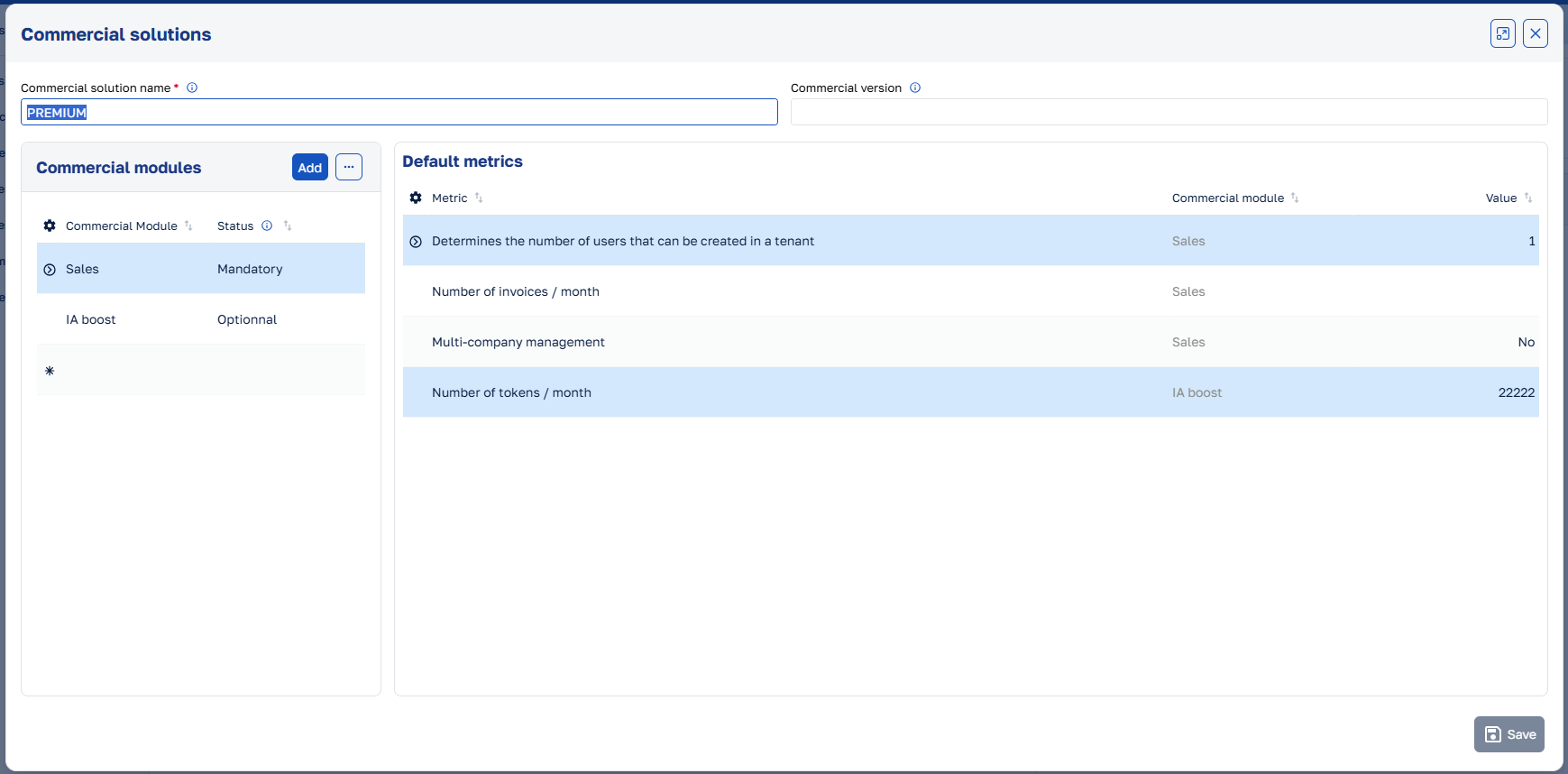
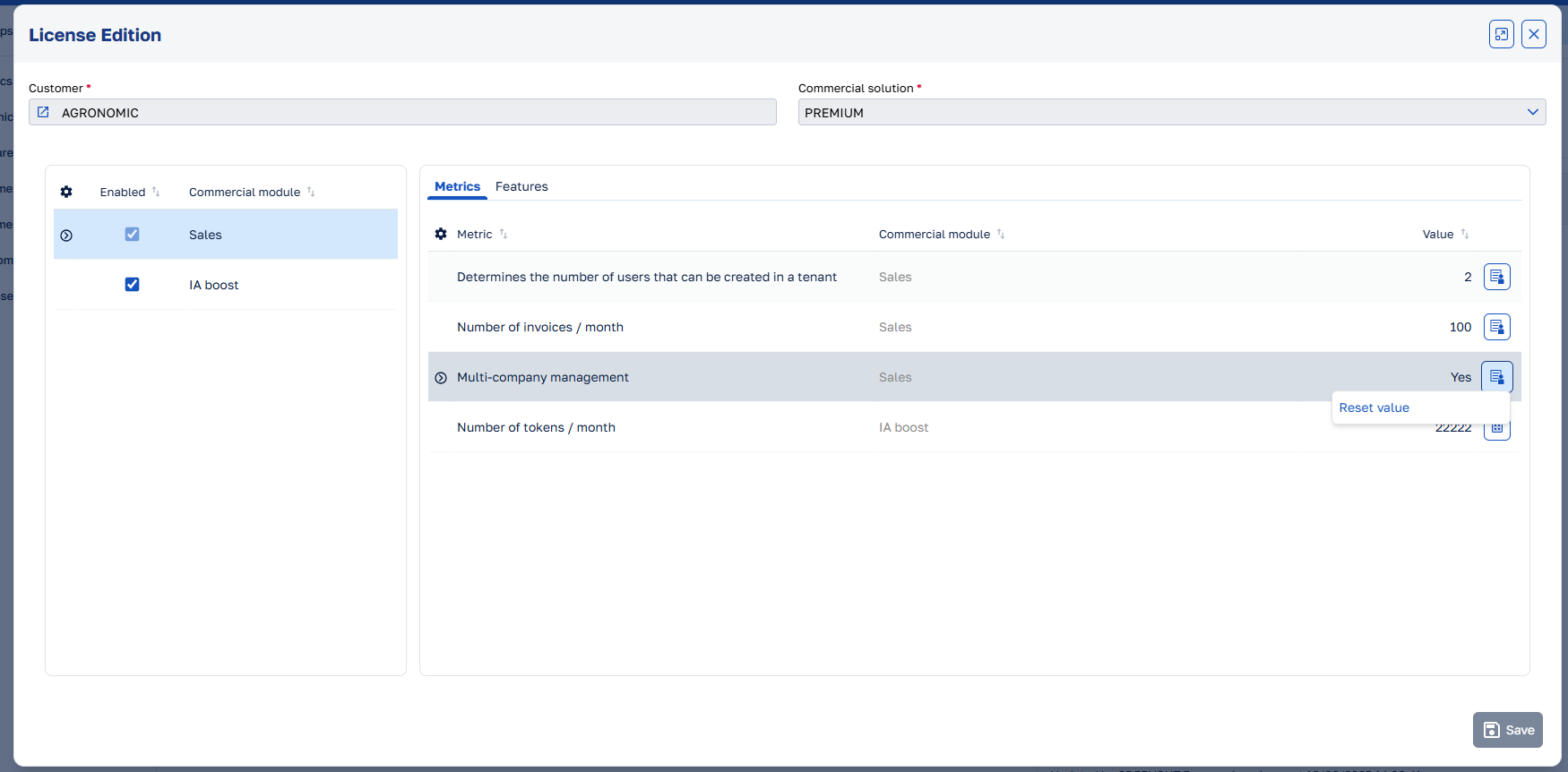
It is now possible to define default values for the metrics in the commercial solution. This makes it possible to retrieve this value when a license is created. The values can be overridden on the license, but the default value will be used if no value is set. To see more about how to configure commercial solutions and licenses, please refer to the License Management Guide.
Logical deletion
Neos Studio now includes the capability to logically delete items, allowing you to disable them instead of permanently removing them. Disabled items can also automatically be excluded when retrieving data.
Furthermore, if a standard physical deletion fails because an item is referenced by other items, the UI view can now automatically disable the item.
See the documentation to learn how to configure logical deletion.
Distributed tracing with Jaeger and OpenTelemetry
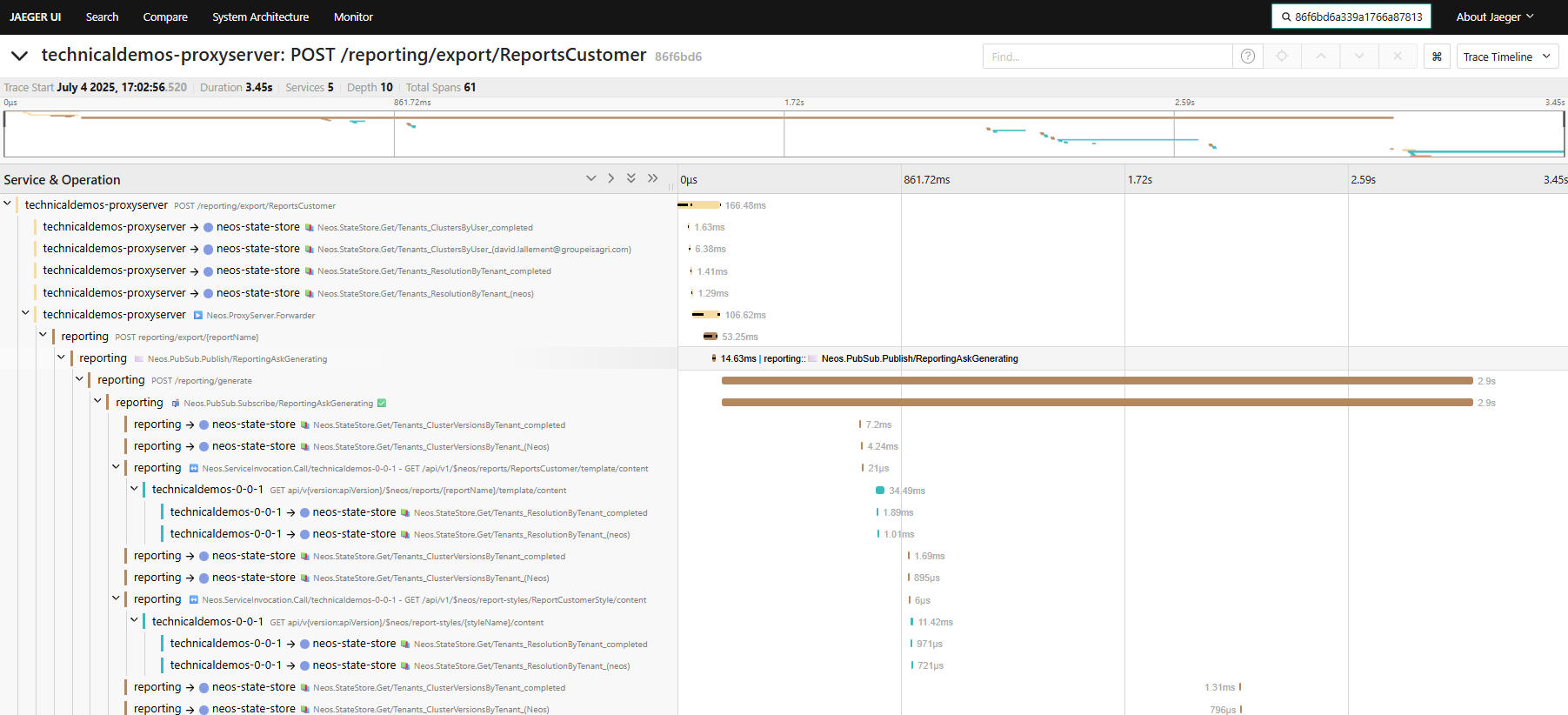
The distributed tracing capabilities in Neos have been enhanced with the integration of Jaeger and OpenTelemetry.
This allows for better monitoring and troubleshooting of microservices-based architectures within Neos in development and production environments.
The hierarchy of traces and spans has been improved to provide a clearer view of the flow of requests across different services.
For more information, see the Distributed Tracing documentation.
Stimulsoft report culture
TL;DR
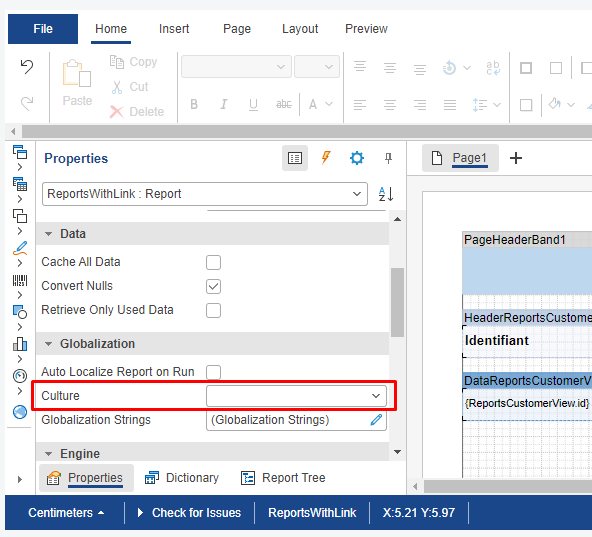
In a nutshell, the reference culture of the template is now used as the default culture for the generated report when the target culture is not explicitly specified by business code.
Explanations
The culture option is used for localizing
- the data extracted from the business cluster (typically the
LocalizableStringproperties) - and the formatting of the content of the report (dates, currencies, native variables, etc.).
The culture option is
- configurable via the
ReportRequestArgumentsconstructor when generating a report by backend code - or via the
WithCultureAPI (available on theExecuteReportOptions,ReportViewerOptionsandShowReportOptionsclasses) in the frontend code.
Previously, when left unspecified, the report's target culture would take a default value
- hardcoded "en" (AKA. "en-US") when the request originated from the backend,
- dynamically based on the culture of the client user when the request originated from the frontend.
Now, when the report has an explicit reference culture, that's what will be used instead.
Please note that for backward compatibility purposes, if the reference culture was left unspecified in the report template, the old behavior still applies: the reporting service will use the user's culture when the request originates from the frontend or "en" (AKA. "en-US") when the request originates from backend code).
Illustrations
The reference culture configurable in the Stimulsoft designer:
The persisted reference culture in an ".mrt" template file using the XML format:
