v2.4.12
Published on Apr 20, 2026.
Breaking changes
- Fixed character casing of the user and tenant identifiers in SignalR notifications. Version 2.4.10 is no longer compatible with versions lower than this one. (16784)
Fixes
- [Helm] Fixed Zipkin pod OOM crashes in production by configuring JVM heap settings to automatically detect container memory allocations (16137), closes 32267
v2.4.11
Published on Mar 03, 2026.
Fixes
v2.4.10
Published on Feb 24, 2026.
Breaking changes
- [Background tasks] The
Identifierparameter ofServerMethodStartOptionsmust now conform to the RFC 1123 subdomain format (lowercase alphanumeric characters, '-' or '.', starting and ending with an alphanumeric character), following the upgrade to Dapr 1.16. (15965) - [Neos studio]
NEOS_DAPR_HttpMaxRequestSizeis now deprecated following its deprecation in Dapr 1.16. You should useNEOS_DAPR_MaxBodySizeinstead. Set the value using size units (e.g., 16Mi for 16MB). The default is 4Mi. See this article in Dapr documentation for more details. Note that using this parameter is not recommended since the limit in deployed environnement will still be 4Mi. (15965)
Features
- [Dapr] Updated Dapr version from 1.13 to 1.16. (15965)
v2.4.9
Published on Jan 12, 2026.
Features
- [Helm] Added the ability to set specific memory request/limit for each deployement (see this article). (15188)
Fixes
- Fixed Helm chart Dapr sidecars version which is now explicitly configured to match the SDK version used by the ecosystem. (15355)
- Added
daprVersionparameter support in Helm chart, enabling proper Dapr sidecar version alignment when deploying clusters with previous versions. See the documentation for more details. (15355) - Fixed an issue where child collection properties were omitted from API requests when the same property name was unbound on the parent. (15242), closes 29933
- Fixed the MultiSelect of a condition on a boolean property in the filter bar. (15204), closes 30399
- Fixed Visual Studio opening when SQL Server Management Studio is installed on the machine. (14940), closes 29596
v2.4.8
Published on Nov 19, 2025.
Features
- Fixed the number of active filters in the
filter-bar(inputsdisplay mode). (14877)
Fixes
- [UserPermissions] Fixed cluster roles not being visible in other clusters when the UserPermissions module was an indirect cluster dependency. (14923), closes 30374
- Fixed string comparison on client side when one of the two strings is null. (14906)
- Fixed the checkbox selection in the datagrid when a client-side filter is applied. (14860)
- [Neos Studio] Fixed client-side filtering on an expression boolean property. (14860), closes 30308
- Made collection properties in create models nullable when nested inside editable references. (14837)
- This prevents unintended loss of existing collection items when posting entities containing editable references. (14837), closes 30273
v2.4.7
Published on Nov 12, 2025.
Features
- Updated Stimulsoft library from version 2025.3.5 to version 2025.4.2 (fixes saving changes after performing the Undo command in the Designer). (14717)
Fixes
- [User Permissions] Fixed roles cache not updated correctly for tenants on separate database. (14775), closes 29839
- Fixed server data export when the file name contained an accent. (14643), closes 29870
v2.4.6
Published on Oct 20, 2025.
Fixes
- [Security] Fixed CVE-2025-55315 (CVSS CRITICAL 9.9). Please update your backend / task-runner docker images to use at least ASP.NET Core Runtime version
8.0.21(see this article for backend and this article for task-runner). (14582), closes 29701 - Fixed handling of unbound entity views with editable reference properties. (14575)
- Fixed documentation containing references to the English culture code which should be "en-GB", not "en-UK". (14545)
v2.4.5
Published on Oct 10, 2025.
Fixes
- Fixed generation of EF Core one-to-one relationship configuration by placing
IsRequiredafterHasForeignKeyto prevent model-building errors. (14492), closes 29522 - Fixed report generation in Legacy mode. (14487), closes 29515
- Fixed crash during full generation and other operations involving .resx file deletions by properly tracking and removing these files in the in-memory solution. Improved workspace stability with thread-safe handling of document updates and deletions. (14491), closes 29443
- [UI Customization] Fixed a migration command that caused an error with a SQL Server database. (14474), closes 29507
- Fixed an exception in custom view when a UI view property is deleted. (14472), closes 29503
- Fixed rule overloading when the parent UI view was redefined in a child module. (14429), closes 29029
- [Tenant Management] Fixed tenants not being returned by the global search. (14400)
v2.4.4
Published on Sep 29, 2025.
Features
- Added
editor-optionsattribute to therich-text-editorcomponent to pass options to TinyMCE editorinitfunction. (14355) - [NeosAICore] Added
editor-optionsparameter toneos-ai-rich-text-editorcomponent to pass options to TinyMCE editorinitfunction. (14355) - [NeosAICore] Added
html-preview-editor-optionsparameter toneos-ai-writing-assistantcomponent to pass options to the HTML preview. (14355)
Fixes
- Fixed logical deletion when physical fails flag wrongly being set to
truewhen an entity view has unbound properties and the entity has no status property. (14334), closes 29148
v2.4.3
Published on Sep 25, 2025.
Fixes
- [Helm] Changed Redis bitnami images reposity to use legacy images. Please see this article for more details on Bitnami's policy change regarding its Docker images. (14314)
- Fixed incorrect download URL in report generation notification when manually emitted by backend code. (14301), closes 29111
- Fixed client-side (TypeScript) code generation when an entity-view uses an interface with a scope set to
MetadataScope.Backend. (14295), closes 29049 - Fixed deletion of references and collections on entities. (14285), closes 28729
v2.4.2
Published on Sep 18, 2025.
Fixes
- Fix breaking change and restore backward compatible retrieval of reports generated by code when using the new persistence mode (and not having to set
$env:NeosReportLegacyMode = $Truein local development either). With this fix, theReportGenerationResponse.ReportContentInBase64property is always populated before the business backend code is called with the response. (14220), closes 28924 - Fixed generated reports folder not available from cluster backend/task-runner pods. (14198), closes 28924
- Updated the documentation related to the tenant management and nested clusters in the deployed environment. (14209), closes 28689
- [UICustomization] Disabled a pre-validation rule temporarily to avoid an error when editing a custom view. (14204), closes 27746
- Fixed file encoding changes when saved using Visual Studio.
.csfiles are now forced toutf-8in generated.editorconfigfile. This fix is only available on new clusters when usingneos initcommand. Please see this article for how to fix it on your existing clusters. (14106), closes 28751 - Updated Stimulsoft library from version 2025.3.4 to version 2025.3.5 (fixes an error when trying to use the Undo feature in the Stimulsoft Designer). (14153), closes 28679
- Fixed diagnostics for template UI bounds values not being reported in the code editor. (14118), closes 28706
- [UI Customization] Fixed restoration of sub view property captions when returning to the original view. (14122), closes 28710
- Fixed the authorization of a resource associated to multiple functions (one authorized, another without permission). (14121), closes 28720
- Fixed extra data loading when displaying the datagrid of an non-embedded collection with infinite scrolling enabled and no vertical scrollbar. (14120), closes 28723
- [Reporting] (Backward compatibility) Fixed the CSV export feature provided by the Reporting service to be able to work with requests emitted from Business clusters based on Neos v2.2. (14100), closes 28747
- Fixed "Export sample business data (.json)" action in the Neos Designer for Stimulsoft reports. (14081), closes 26895
- [Security] [Reporting] Removed display of exception messages from the Stimulsoft Viewer (sensitive information disclosure risk) and replaced them with the same family of localized messages as the ones that are shown in the toast after a failed PDF generation. (14078), closes 28647, 28690
- [Reporting] The subscriber
GenerateAndNotifyAsyncuses the correct UI Culture when localizing its eventual error messages. (14078), closes 28647, 28690 - Fixed partial URL generation for images and files in EF Core queries. (14073), closes 28683
v2.4.1
Published on Sep 02, 2025.
Fixes
- [User Permissions] Renamed
Printimage toNeosPrintto avoid conflicts. (14056) - [User Permissions] Fixed retrieval of permissions for a function whose type changed without permissions being updated after the type change. (14057), closes 28667
v2.4.0
Published on Sep 01, 2025.
Key insights
Welcome to the 2.4 release of Neos. There are many updates in this version that we hope you'll like, some of the key highlights include:
- Typed IDs for UI Elements
- Dependency viewer
- Migrated test projects to XUnit v3
- License Management
- Logical deletion
- Distributed tracing with Jaeger and OpenTelemetry
- Stimulsoft report culture
Typed IDs for UI Elements
Neos now provides strongly-typed identifiers for UI elements (UIViews, Images, Reports, Themes) to replace hard-coded strings and improve code safety. These classes are automatically generated during the build process.
// Before (obsolete)
new NavigationOptions("CustomerListUI").WithIcon("Settings")

// After
new NavigationOptions(UIViews.CustomerListUI).WithIconId(Images.Settings)
For automatic migration of existing code, use the convert-ui-string-literals.ps1 script from the Neos repository. For dynamic scenarios, use the FromName() method: UIViewId.FromName(dynamicName).
For comprehensive information, see Typed IDs for UI Elements.
Dependency viewer
A new powerful tool has been added to Neos Studio to help you analyze and understand dependencies between various elements in your Neos cluster. The Dependency Viewer provides a visual tree representation of how different elements relate to each other by scanning both metadata dependencies and code references (server-side business assemblies and C# code within metadata). This comprehensive analysis is essential for understanding the impact of changes and maintaining clean architecture.
The tool offers four different analysis modes:
- Display all references to a specific item: Shows what elements use a selected element
- Show all references for items of a given type: Shows all references for all items of a selected type
- Show defined but unused items: Identifies elements that are defined but not referenced anywhere
- Accessibility change suggestions: Provides recommendations for accessibility changes
You can access the Dependency Viewer from the Tools section in Neos Studio, or use convenient shortcuts like Shift+F12 or the "Find all static references" button available throughout the application.
For detailed usage instructions, see Dependency viewer.
Migrated test projects to XUnit v3
Neos test projects have been migrated to the latest version of XUnit. Please see this article for more details of the changes in the base XUnit package.
To migrate your current unit tests or E2E tests in your Neos clusters, here are some known changes to make in your solutions.
Test projects without code
If you created business assembly projects (eg: ModuleName.Application.csproj / ModuleName.Domain.csproj), it automatically created associated test projects.
If no test is created in those projects and you try to run your tests in a CI/CD pipeline by using dotnet test on your cluster solution, the command will fail because XUnit v3 can't handle empty test projects.
One solution is to remove the test project directory from your source repository. Otherwise, it is also possible to create a single dummy test.
Nuget package updates
Neos test helpers projects uses XUnit v3 packages. If your business assembly test projects are still in v2 and you try to use Neos helpers, these projects will not build telling there is an ambiguity between XUnit versions.
To resolve this problem, you can replace all package reference like the following:
| Before | after |
|---|---|
<PackageReference Include="xunit" Version="2.X.X" /> |
<PackageReference Include="xunit.v3" Version="2.0.3" /> |
<PackageReference Include="Xunit.DependencyInjection" Version="9.9.0" /> |
<PackageReference Include="Xunit.DependencyInjection" Version="10.4.2" /> |
Note
If your package definition is set in .csproj files of business assembly test projects, you can remove the following packages since they are already defined in generated .props files:
Microsoft.Extensions.DependencyInjection
Microsoft.NET.Test.Sdk
xunit
xunit.runner.visualstudio
FluentAssertions
Moq.AutoMock
Microsoft.Extensions.Logging.Abstractions
please see this article for more details.
If you created helpers projects (eg: C# projects referencing Xunit but without tests), you'll need to change xunit packages references to xunit.v3.extensibility.core.
Example (before):
<PackageReference Include="xunit" Version="2.9.3" />
<PackageReference Include="Xunit.DependencyInjection" Version="9.9.0" />
<PackageReference Include="xunit.runner.visualstudio" Version="3.0.2">
    <PrivateAssets>all</PrivateAssets>
    <IncludeAssets>runtime; build; native; contentfiles; analyzers</IncludeAssets>
</PackageReference>
Example (after):
<PackageReference Include="xunit.v3.extensibility.core" Version="2.0.3" />
Unit tests
ITestOutputHelper namespace has been moved from Xunit.Abstractions to Xunit.
In your test files, you can remove all using Xunit.Abstractions; and replace them by using Xunit; if not already present.
Migration scripts
In case you have not defined utf-8 as charset for .cs files, please add the following lines to the .editorconfig file at the root of your git repository :
[*.cs]
charset = utf-8
If you saved any file with special latin chars (like é or €) using Visual Studio it could have encoded them as iso-8859-1. To convert them to utf-8, you can use the convert-testfiles-to-utf8-on-windows.ps1 script from the Neos repository.
To migrate your test files you can use the migrate-xunitv3.ps1 script from the Neos repository.
E2E tests
If you created E2E tests having [TestCaseOrderer("GroupeIsa.Neos.Shared.XUnit.PriorityOrderer", "GroupeIsa.Neos.Shared.XUnit")] attributes, you can replace the attribute by [TestCaseOrderer(typeof(PriorityOrderer))] and add using GroupeIsa.Neos.Shared.XUnit; in your test file.
Note
You can run the command neos sync uitests to automatically update your test files with the new TestCaseOrderer attribute and the new using directive.
A note on testing async methods
XUnit v3 will raise a warning if in your test you use a method accepting a CancellationToken as argument without providing it. In this case, you can use the TestContext.Current.CancellationToken.
Example (before):
[Fact]
public async Task ValidationShouldWork()
{
    // Arrange
    OrderDetail item = new();

    // Act
    IValidationRuleResult result = await ExecuteValidationRuleAsync(item); // CancellationToken not provided

    // Assert
    result.IsSuccess.Should().BeTrue();
}
Example (after):
[Fact]
public async Task ValidationShouldWork()
{
    // Arrange
    OrderDetail item = new();

    // Act
    IValidationRuleResult result = await ExecuteValidationRuleAsync(item, TestContext.Current.CancellationToken);

    // Assert
    result.IsSuccess.Should().BeTrue();
}
Removal of Serilog.Sinks.XUnit
If you try to run a cluster built with a previous Neos version it may throw exception like the following:
BackEnd: Unhandled exception. System.IO.FileNotFoundException: Could not load file or assembly 'Serilog.Sinks.XUnit, Version=3.0.19.0, Culture=neutral, PublicKeyToken=null'.
In this case, please delete the server directory of your cluster or clean the previous build folder (eg: /server/bin).
Culture
If some tests fail because they use the developer machine's language instead of the neutral language, you can force the culture of a test or test class using the [UseCulture("xx-XX")] attribute. For example, to force the use of French (fr-FR) resources on a class, but English (en-US) on a specific test:
[UseCulture("fr-FR")]
public class SomeTestClass : TestBase
{
    public SomeTestClass(ITestOutputHelper output)
        : base(output)
    {
    }

    [Fact]
    public void ShouldGetEmptyRowVersionIsUntracked()
    {
        // This test will use fr-FR culture.
    }

    [UseCulture("en-US")]
    [Fact]
    public void ShouldUseEnglishUSCulture()
    {
        // This test will use en-US culture.
    }
}
Note
By default the TestBase class uses en culture.
License Management
Default value for metrics defined in commercial solutions
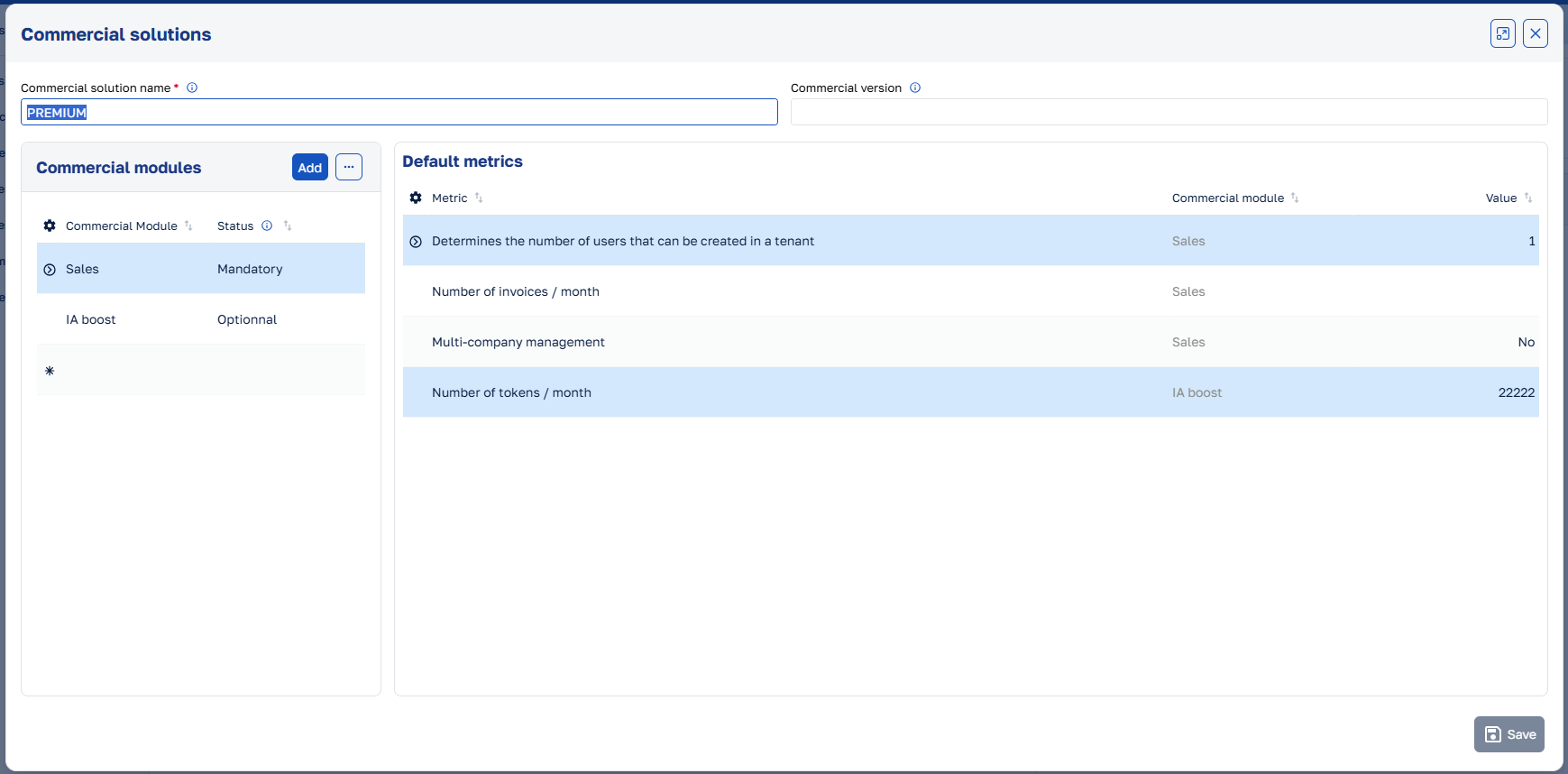
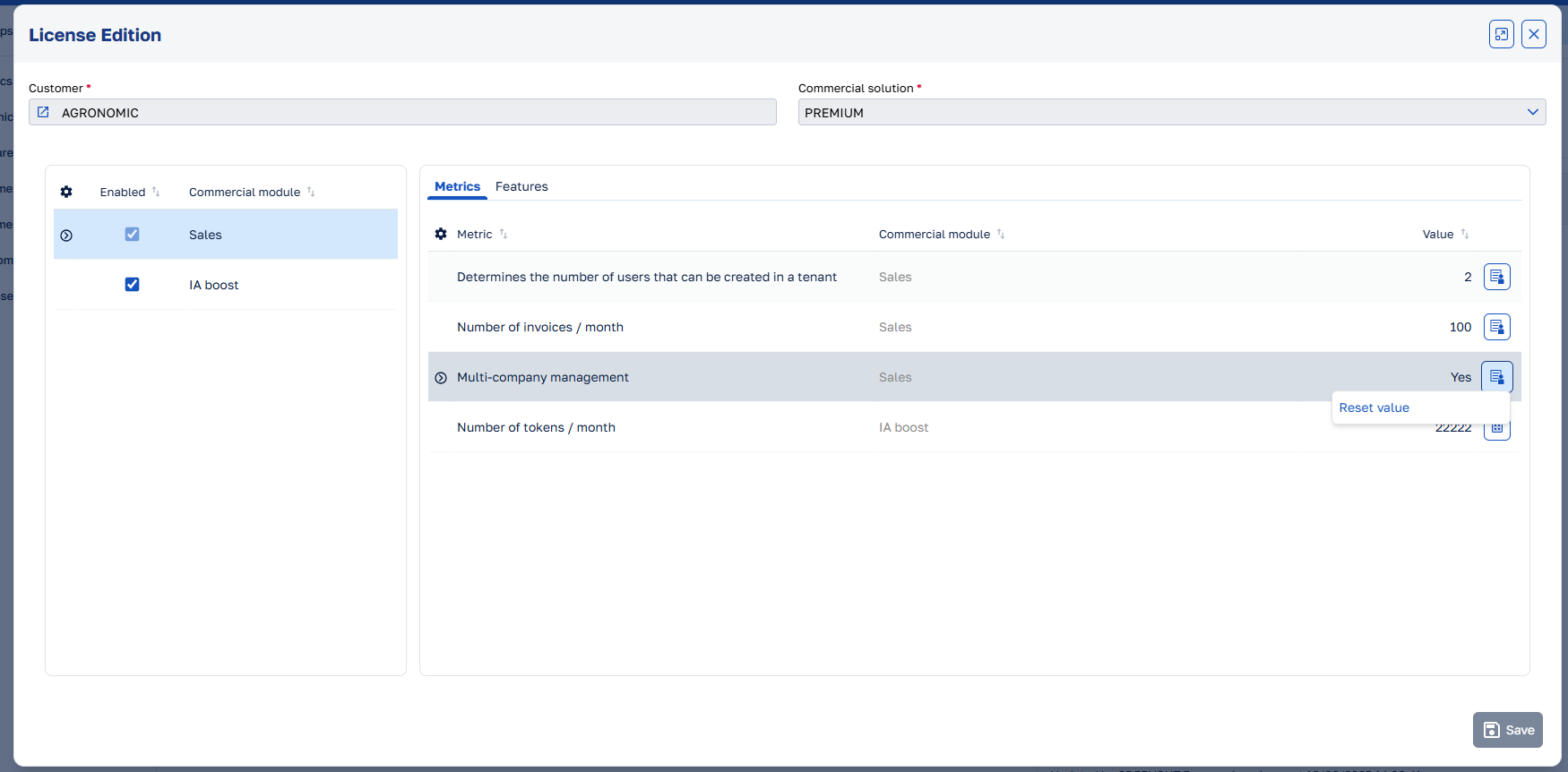
It is now possible to define default values for the metrics in the commercial solution. This makes it possible to retrieve this value when a license is created. The values can be overridden on the license, but the default value will be used if no value is set. To see more about how to configure commercial solutions and licenses, please refer to the License Management Guide.
Logical deletion
Neos Studio now includes the capability to logically delete items, allowing you to disable them instead of permanently removing them. Disabled items can also automatically be excluded when retrieving data.
Furthermore, if a standard physical deletion fails because an item is referenced by other items, the UI view can now automatically disable the item.
See the documentation to learn how to configure logical deletion.
Distributed tracing with Jaeger and OpenTelemetry
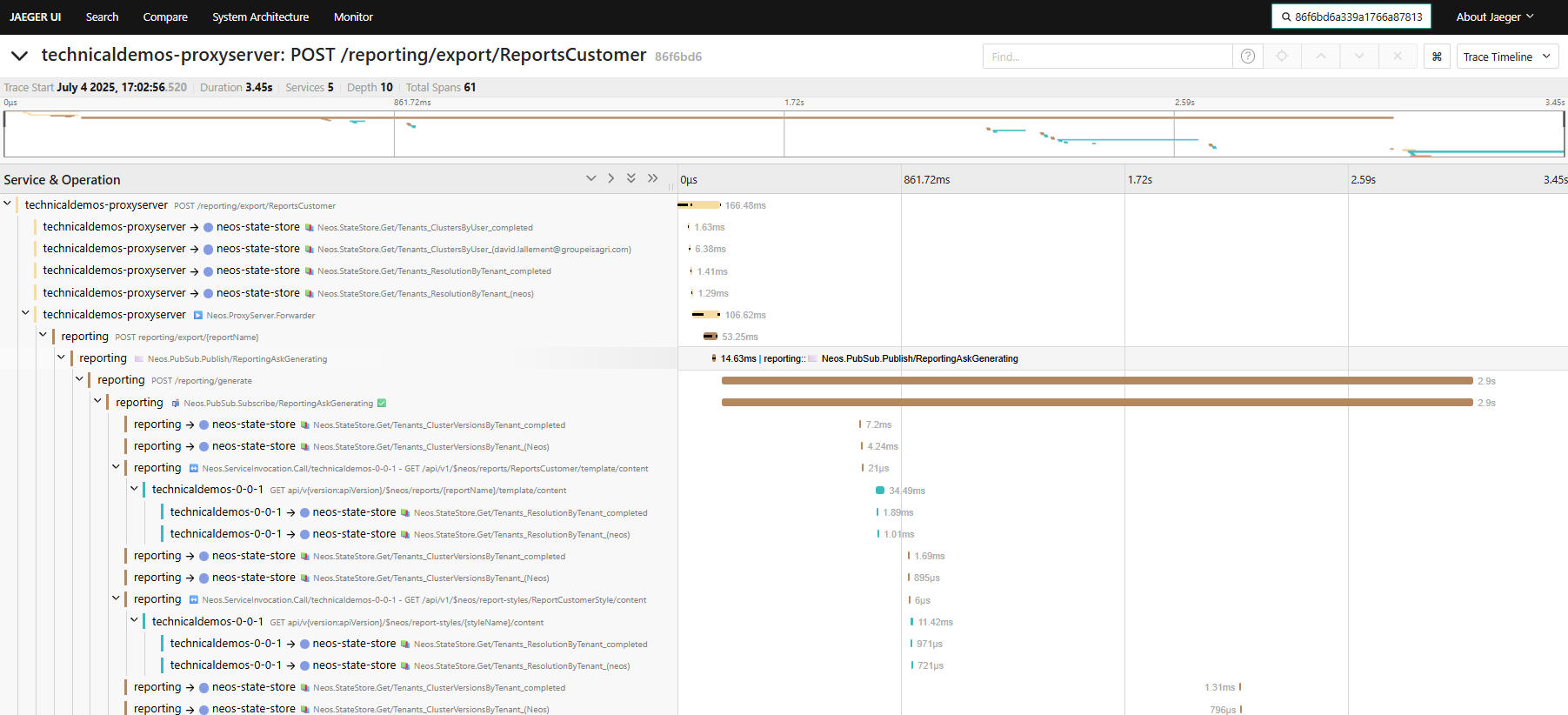
The distributed tracing capabilities in Neos have been enhanced with the integration of Jaeger and OpenTelemetry.
This allows for better monitoring and troubleshooting of microservices-based architectures within Neos in development and production environments.
The hierarchy of traces and spans has been improved to provide a clearer view of the flow of requests across different services.
For more information, see the Distributed Tracing documentation.
Stimulsoft report culture
TL;DR
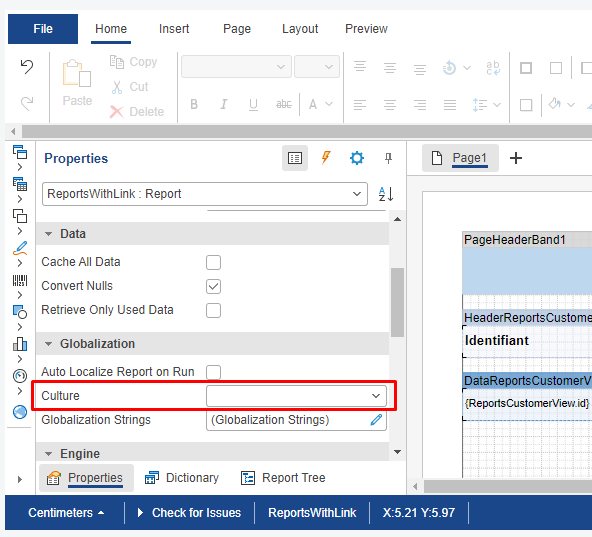
In a nutshell, the reference culture of the template is now used as the default culture for the generated report when the target culture is not explicitly specified by business code.
Explanations
The culture option is used for localizing
- the data extracted from the business cluster (typically the
LocalizableStringproperties) - and the formatting of the content of the report (dates, currencies, native variables, etc.).
The culture option is
- configurable via the
ReportRequestArgumentsconstructor when generating a report by backend code - or via the
WithCultureAPI (available on theExecuteReportOptions,ReportViewerOptionsandShowReportOptionsclasses) in the frontend code.
Previously, when left unspecified, the report's target culture would take a default value
- hardcoded "en" (AKA. "en-US") when the request originated from the backend,
- dynamically based on the culture of the client user when the request originated from the frontend.
Now, when the report has an explicit reference culture, that's what will be used instead.
Please note that for backward compatibility purposes, if the reference culture was left unspecified in the report template, the old behavior still applies: the reporting service will use the user's culture when the request originates from the frontend or "en" (AKA. "en-US") when the request originates from backend code).
Illustrations
The reference culture configurable in the Stimulsoft designer:
The persisted reference culture in an ".mrt" template file using the XML format:

Breaking changes
- [User Permissions] A client-type user can no longer view, create, edit, or delete editor-type roles. (13973)
- [User Permissions] A client-type user can no longer have an editor-type role. (13973)
- Modified the severity of message
M0012: Entity property does not existfrom warning to error. (13933) - [C# Dependencies] Updated
FluentResultsfrom version 3.16.0 to 4.0.0: the types of theErrorsandSuccessesproperties are nowIReadOnlyList. If you use theForEachmethod on one of these properties, you need to replace it with theforeachinstruction.
More details : 13922 - Changed the
SendToUserConnectionsAsync(string name, string userIdentifier)method of theINotificationContextservice to send notifications only to the user’s connections within the current tenant instead of across all tenants. (13894) - Changed the
SendToCurrentUserConnectionsAsync(string name)method of theINotificationContextservice to send notifications only to the current user’s connections within the current tenant instead of across all tenants. (13894) - Changed the behavior of the fluent API associated with the
ReportRequestArguments. It now always returns the same instance (similar to all other fluent APIs implemented in the framework). On top of the homogeneity problem, this was also neither performant nor did it offer immutability since the dictionaries of parameters were share across cloned instances anyway. The change is unlikely to impact anyone, but in case immutability was actually needed, we're also adding aClonemethod to allow creation of multiple requests based on a single blueprint. (13828) - [User Permissions] Removed the
Permission.HasAccesscolumn to make it easier to switch between AllowDeny and CRUD permissions. If you were using it, you need to replace your :
byyourPermission.HasAccess = true; // or false;
Note that the migration of existing permissions in the database is handled by the framework.yourPermission.HasCreationAccess = true; // or false; yourPermission.HasDeleteAccess = true; // or false; yourPermission.HasUpdateAccess = true; // or false; yourPermission.HasReadOnlyAccess = true; // or false;
More details : 13795 - [UserPermissions] Marked
UserAuthenticationdata object as obsolete. Use your own data object instead. (13703) - [UserPermissions] Marked
UserPermissionsMethodResultdata object as obsolete. Use your own data object instead. (13703) - [UserPermissions] Marked
AzureAdB2CUserdata object as obsolete. UseAuthUserdata object instead. (13703) - [UserPermissions] Marked
SendAzureAdB2CTemporaryPasswordEmailserver method as obsolete. UseSendAuthTemporaryPasswordEmailserver method instead. (13703) - [UserPermissions] Marked
GetAzureAdB2CTemporaryPasswordEmailBodyTemplateserver method as obsolete. UseGetAuthTemporaryPasswordEmailBodyTemplateserver method instead. (13703) - C# classes generated for resources are now named
{ModuleName}Resourcesinstead of{ModuleName}.- If you access resources using the syntax
Resources.{ModuleName}.{ResourceName}, no change is required and your code will still compile. - If your code explicitly references the class name (e.g.
{ModuleName}), you must update it to{ModuleName}Resources.
However, it is strongly recommended to use the syntaxResources.{ModuleName}.{ResourceName}, which avoids such breaking changes and ensures the reference search tool can correctly detect usages via regular expressions.
More details : 13619
- If you access resources using the syntax
- [UserPermissions] Removed unused
UsersAssignedToRoleUIUI view. (13542) - [UserPermissions] Removed unused
UserPermissionsTemplateListUI component. (13542) - [UICustomization] Renamed
CustomSubUIViewSubViewentity view toCustomSubUIViewView. (13617) - [UICustomization] Removed unused
DefaultCustomUIViewUIUI view. (13617) - [UICustomization] Removed unused
CustomUIViewDetailUIUI view. (13617) - Tenant management now encrypt database connection strings in its database. You'll need to configure
EncryptionKeyto migrate. Please see this article for development, and this article for production. (13450) - Updated client development dependencies. Neos now requires Node.js v22.12.0 or later. (13479)
- Changed the sorting execution logic when full data is loaded on the client. Sorting is now performed server-side by default. To revert to client-side sorting when all data is available on the client, set the following property (e.g., in the
InitializedUI view event rule):SortingBehavior.ExecutionSide = SortingExecutionSide.ClientWhenFullDataLoaded;
More details : 13298
- Migrated from Xunit v2 to v3. Please see this article on how to migrate your projects. (13260)
Features
- [UI Customization] Modified the UICustomization function type from
Allow/DenytoCRUD. A user may only have read-only rights in order to use the custom views that other users have created. (14000) - Added access to data objects and enums without having to add a
usingor writing their full namespace in entity validation rules, entity view event rules, entity view expressions, entity view validation rules and server methods. (13935) - Added capability to show error messages in the Stimulsoft Designer instead of an abscons 500 Server Error message. (13940)
- Improved caption persistence in custom views to only persist changes from the original view. (13249)
- Improved SSO authentication by automatically prepending
www.to the callback URL host when the request origin starts withwww.and both hosts match without the prefix. (13954) - Updated Stimulsoft library from version 2025.3.3 to version 2025.3.4. (13938)
- [Tenant Management] Added the ability to filter licence information from the tenant listing API. (13932)
- Added the
SendToUserConnectionsAsync(string name, string tenantIdentifier, string userIdentifier)method to theINotificationContextservice to send notifications to a user’s connections within a specified tenant. (13894) - Added
DropdownItemSelectedHoverBackgroundandDropdownItemSelectedHoverForegroundattributes toInputcomponent in the theme. (13915) - When the target culture of a generated report is not specified in the generation options, the reporting service will prefer using the reference culture from the template report (as long as it's been properly configured) instead of any other defaults. Corollary: when the reference culture is properly configured in the report template, and you are working in a mono-language cluster/environment, there is no need to specify the target culture anymore (i.e. no need for
WithLocalizationDataCulturein such case). (13852) - Added the ability to persist generated reports on a distributed file system in production (see this article) to extend report size limitation (4MB). (13414)
- [Neos Studio] Updated search to be able to find UI components from their tag. (13887)
- [Neos notification center] Added methods
ToAllUsersInCurrentTenantandToCurrentUserto classUserNotificationOptions. (13875) - Added the
UI.ShowToastmethod to be able to show a toast in a UI shared method. (13878) - [All neos clusters & Neos Studio] Improved icons and added missing dark icons. (13860)
- [Neos Studio] Added new icons and tooltips to differentiate the scope and business assembly layer of data objects, enumerations, interfaces and string resources. (13860)
- [Tenant Management] Added whitespace handling for
FirstNameandLastNamewhen creating a tenant. (13851) - Added the ability to configure a status property and the values that indicate whether an item is enabled or disabled. (13817)
- Added a status filter mode on entity views to automatically filter items based of the value of their status property. (13817)
- Added a deletion mode on entity views to specify whether items are physically or logically deleted.
Depending on the configuration of the entity view they are base on, UI views can now physically delete an item as usual, logically delete an item or logically delete an item if physical deletion fails due to existing references.
See the documentation for more information.
More details : 13817 - Improved function type change by removing the
Permission.HasAccessproperty. See Breaking changes part to find out more. (13795) - Updated Stimulsoft library from version 2025.2.5 to version 2025.3.3. (13515)
- [UserPermissions] Added Microsoft Entra External ID support. (13706)
- Modified the transfer of the SSO context to the client to use the URL instead of a cookie. The SSO context values must necessarily be strings. (13762)
- Added documentation on the UI view property format. (13760)
- Added capability to hardcode a text size in pixels, instead of using the predefined theme's sizes (e.g.
small,large, etc.). (13725) - Added
content-cssattribute torich-text-editorcomponent to load CSS file(s). (13724) - Added
content-styleattribute torich-text-editorcomponent to inject CSS style. (13724) - [NeosAICore] Added
content-cssparameters toneos-ai-rich-text-editorcomponent to load CSS file(s). (13724) - [NeosAICore] Added
content-styleparameters toneos-ai-rich-text-editorcomponent to inject CSS style. (13724) - [NeosAICore] Added
html-preview-content-cssparameters toneos-ai-writing-assistantcomponent to load CSS file(s) in the HTML preview. (13724) - [NeosAICore] Added
html-preview-content-styleparameters toneos-ai-writing-assistantcomponent to inject CSS style in the HTML preview. (13724) - [Neos AI Core] Added parameter ai-writing-assistant-advanced-assistant-input-rows to component NeosAiRichTextEditor to customize the number of rows in the input of the advanced assistant of the AI writing assistant. 3 by default. (13722)
- [Neos AI Core] Added parameter advanced-assistant-input-rows to component NeosAiWritingAssistant to customize the number of rows in the input of the advanced assistant. 3 by default. (13722)
- Added Calendar component attributes in the theme. (13720)
- Improved Calendar component to highlight the current day. (13720)
- Added the option to change a tenant's status to inactive with the Tenant Management. When a tenant is inactive, it can no longer connect to any application (cluster). (13683)
- Added the ability to start, stop Jaeger in the manager. (13681)
- Improved Jaeger installation on Windows. (13681)
- Added the ability to set a status property, an active status value and an inactive status value on entities. (13672)
- Added the ability to configure logical deletion on an entity view according to the status properties set on the entity. (13672)
- Added the ability to configure a status filter mode on an entity view to automatically filter items according to the status properties set on the entity. (13672)
- Added the ability to deploy jaeger tracing (see this article). (13593)
- [UICustomization] Added style rules in custom views. (13624)
- Added
Dependency viewertool in Neos Studio to analyze and visualize dependencies between elements, metadata, and code references across your cluster. This tool helps track element usage, identify unused components, and understand the impact of changes. (13676) - Added strongly-typed identifiers (
UIViews,Images,Reports,Themes) for UI elements to replace hard-coded strings and provide compile-time validation. (13664) - Added a link to Jaeger associated with an HTTP request in the neos run manager page. (13577)
- Added a cache to improve invalidation of lookup properties to reduce the number of API calls. (13649)
- Changed the json serialization from base64 to hexadecimal for the rowversion property. (13608)
- Enabled datagrid infinite scrolling on all clusters provided by Neos Framework. (13542)
- Improved filter on Date/Time properties. (13580)
- Added possibility to specify a scope and a layer on enumerations. (13459)
- Added
event:mouseenterandevent:mouseleavedirectives. (13574) - Added
layout:visibilitydirective to complementlayout:visible. New three-state visibility control (visible, hidden, collapsed) provides additional visibility options beyond the existing booleanlayout:visibledirective. (13574) - Added column movable option on UI view properties. (13579)
- Improved the color input component to allow manual value entry via text. (13575)
- Added the ability to encrypt values for entity properties in database. Only
Stringproperties are eligible for encryption. See this article. (13450) - Added horizontal alignment option on UI view properties. (13557)
- Added deletion of overloaded report mrt file when report is deleted. (13554)
- Added
footer-countsattribute to force the display or hiding of the rows count in the datagrid footer. (13543) - Added
spinnercomponent. (13539) - Added
cell-colspanattribute todatagridcomponent to be able to merge cells of a row. (13518) - Improved the distributed tracing (see this article for more details). (13478)
- Improved creation of business assembly projects so that you can choose which projects are generated. (13475)
- Added
load-data-on-scrollcomponent to automatically load data on scroll. (13447) - Added
SetItemsandAppendItemsmethods on theIDatasource<TUIView>interface. (13447) - Add the ability to create a controller in a business assembly in the application layer. (13442)
- Improved error handling in interservice calls to enable retrieval of detailed error information. See documentation. (13438)
- Added possibility to specify a scope on interface. (13409)
- Added multiple selection in the modal of a lookup of the filter bar. (13417)
- Added support for disabling auto-loading on reference-type subviews. (13425)
- Added possibility to specify a scope on string resource. (13331)
- Added "Content display mode" and "Horizontal alignment" options on UI view style rules. (13358)
- Updated Stimulsoft library from version 2025.1.4 to version 2025.2.5. (13359)
- Added sort indicators on the datagrid when the Entity View has a default sort. (13340)
- Added the ability to bind a
Field/Computedto theproperty-nameof a<label>or<text>component. (13332) - Improved property entry of reference and collection types in entity views. (13332)
- Added
RadioGroupcomponent attributes in the theme. (13329) - [License Management] Added default metrics for commercial solutions. (13279)
- Added
ClientDependencyOverridessection to the cluster configuration file to generate theoverridesfield in clientpackage.jsonfile for managing sub-dependency breaking changes. (13311) - Added transpilation support for System.Linq.Enumerable.GroupBy without a result selector. (13263)
- Added support for handling non-editable and non-embedded references within subviews. (13254)
- Added technical architecture documentation for the user account synchronization feature. (13221)
- Improved user account synchronization message flow. This synchronization message was incorrectly published when the user account was assigned to the tenant. (13216)
- Added comboboxes to select the properties that trigger client-side entity view validation rules and UI view pre-validation rules. (13157)
Fixes
- Fixed filtering on entity view properties of type File or Image. The filter was not working because the C# expression generating the partial URL for the file or image could not be translated into SQL by EF Core. (14042), closes 28301
- Fixed rich text editor toolbar popup staying open and appearing over other elements after clinking on one of its buttons. (14038), closes 27686
- Fixed foreground color of the placeholder text of a read only combobox. (14028), closes 28634
- Fixed change indicator being displayed when changing the value of an unbound property when using data sharing. (14011), closes 23514
- Fixed the error when clicking a button in a datagrid that closes the UI view. (14003), closes 28613
- [Neos AI] Fixed tenant lookup to display all tenants instead of limiting results to the first 10. (13982), closes 27192
- Fixed the SetData method in unit tests to ensure entities are saved with both their base types and their actual types. (13984), closes 28317
- Fixed the scrollbar in the default tenant selection page. (13968), closes 27619
- [Neos Studio] Fixed retrieving of inherited entity properties which was conditioned by the loading order of the entities. (13961), closes 28559
- Fixed
Invokemethod transpilation ofSystem.ActionandSystem.Func. (13951), closes 28525 - Fixed dropdown submenus that could exceed the page height and had no scrollbar. (13833), closes 28320
- [Neos Studio] Fixed parent action reset on location change in UI view actions. (13919), closes 28480
- [Neos Studio] Fixed opening of the automation test project with the selected IDE. (13918), closes 27283
- Fixed error when a UI view embedded in another contains a
template-modal-header(ortemplate-modal-footer) component in its template. (13900), closes 28451 - Fixed displaying the technical error message in the additional data section of the error modal instead of in the main message when an API request fails. (13903), closes 25328
- [User Permissions] Fixed loading of
DefaultAllowedFunctionssettings (13914), closes 28475 - Fixed
TreeViewnode color when hovering node with a long text longer that theTreeViewwidth. (13913), closes 27917 - [Neos Studio] Fixed image file being deleted when an image (metadata) deletion fails. (13907), closes 28422
- [Neos Studio] Fixed filtering of entity, entity view and UI view properties via the search input above the tree view to be correctly synchronize with the properties in the tree view. (13906), closes 27725
- Fixed
layoutdirectives onactionbuttons. (13899), closes 25224 - Fixed return type of UI view event rule methods from
voidtoTask. Please note that pre-existing codes, such as module-based rule overloading (e.g.ParentModule.OnInitialized(Arguments)) and UIView-based inheritance (e.g.base.OnInitialized(Arguments)), may need to be prefixed either byawaitor the discard placeholder_ =. (13889), closes 28354 - Fixed chatbot prompt height when opened from a search without results. (13904), closes 27297
- [Neos Studio] Fixed the opening of the images, string resources UI of two different modules from the tree view. (13898), closes 28013
- Fixed
style:colordirective onlabelcomponent. (13895), closes 27260 - Fixed UI views being forced to open in a popup when opened immediately after showing a message. (13883), closes 28398
- [User Permissions] Fixed user roles cache not being updated correctly (race condition when starting multiple backends simultaneously). (13861), closes 28003
- Fixed informational logs with exceptions causing failures in Application Insights. (13877), closes 28407
- Fixed reset of validation message tooltips on the datagrid add row. (13859), closes 27446
- Added missing
DestinationTimeZone,LocalizationUICultureandUIViewNameproperties toReportRequestArguments. (13828), closes 28307 - Fixed the documentation of automation method
IDatagridComponent.ClickOnCell(string colName, string cellText)that incorrectly described the first parameter as the column caption, when it actually is the column name. (13842) - Fixed the position of UI view member enums in the datagrid. (13841), closes 28207
- [UserPermissions] Fixed current permission reset when changing role. (13843), closes 28322
- [NeosAICore] Fixed an issue where writing assistant AI actions could remain disabled if a request failed. (13844), closes 28199
- Fixed the presence of the
Addaction in the toolbar when its location is overridden programmatically. (13836), closes 28325 - Fixed filter serialization with Invariant Date/Time value. (13830), closes 28318
- Added a validation rule to check the uniqueness of the tenant ID. The search is case-insensitive. (13816), closes 27582
- Fixed full generation from Neos Studio so that it no longer depends on the Visual Studio solution loaded in memory. (13797), closes 28009
- Fixed Add action button position on mono-record UI view with reference sub view. (13776), closes 28263
- Fixed reactivity of the summary row when a property of a item loaded from the server changes. (13743), closes 28216
- Fixed an issue where the default custom view was not applied when reopening the UI view, thus eliminating the need to reload the application. (13714), closes 27253
- Fixed execution order issue when focusing on a lookup and opening the modal of another lookup. The value of the first lookup is now persisted before the ReferenceRetrieving rule of the second one is triggered. (13711), closes 28166
- Fixed YAML dependency check that sometimes failed when a reference was modeled without a corresponding collection. (13665), closes 28010
- [UICustomization] Fixed unique index on
$NeosDefaultCustomUIViewtable. (13670), closes 28039 - [Neos Studio] Fixed IntelliSense on the visibility condition of functions. (13671), closes 28037
- Fixed row reselection on click on current cell. (13654), closes 27963
- Improved filter bar component for Date/Time properties. (13596)
- Fixed datagrid infinite scrolling new row placement: New row now appear at the top when more data is available to load, otherwise at the bottom when fully loaded (previously always at bottom). (13604), closes 27916
- Fixed UI runtime warnings when a
contextelement is inside arepeat. (13587), closes 27924 - Fixed bound value check for directives attributes. (13586), closes 27922
- Fixed not transmitting HTTP headers added in RemoteServiceOptions in a service invocation without DAPR/ (13547), closes 27787
- Added missing tooltip on datagrid column headers. (13551)
- Fixed virtual items so that changes to relationships are properly taken into account. (13549), closes 27749
- Added a transpilation error indicating that the use of a when clause in a switch statement is not supported. (13546), closes 27718
- Fixed
ViewModel.GetParentViewModeldefinition, the result of this method is now nullable. Note that this may cause generation warnings. (13152), closes 26903 - Fixed the
PositionChangedevent rule to always trigger when an item is removed. (13538) - Fixed parameter loss occurring when renaming a UI method. (13521), closes 27720
- [Neos Studio] Fixed filter on DataType properties. (13514), closes 27509
- Pinned version of the sub-dependency
@primeuix/stylesto prevent visuals regressions. (13517), closes 27714 - Fixed initial mouse/keyboard focus and accessibility problem in Stimulsoft Designer. (13509), closes 27705
- Fixed viewer behavior with regards to dashboard usage : 1. fixes the refresh capability in the viewer, 2. fixes use of buttons (as long as they have explicit styles for their "checked", "hover" and "pressed" states (in which case the Viewer and the default font loading mode
ReportingFontsLoadingMode.Embedshould work). (13439), closes 27497, 27554 - [UserPermissions] Added a validation rule to prevent users from deactivating their own user account. (13476), closes 27616
- Fixed handling of manually entered exact values in the lookup field (in "Starts With" and "Quick Search" search modes). (13460), closes 27071
- [Neos Studio] Fixed duplicate opening of the same UI view. (13461), closes 27632
- Fixed filter optimization to run once when applying instead of on every change. (13415), closes 26288, 27381
- [UserPermissions] Fixed permissions tree refresh when selecting a role. (13446), closes 27353
- Fixed invalid behavior in generating meta operations within the context of multi-level inheritance entities. (13440), closes 27559
- Fixed an issue with the synchronization of the administrator role, which was being applied to all clusters within a tenant. (13436), closes 27595
- [Neos Studio] Fixed generation buttons that could be enabled during a generation. (13431), closes 27596
- Fixed datagrid detail row height calculation. (13423), closes 27254
- Improved client-side quick search algorithm. (13406), closes 27512
- Fixed execution of a validation rule dependent on multiple source elements that was running on the first element regardless of which element was modified. (13412), closes 27207
- Fixed the behavior of navigation properties in instances returned by the
GetOriginalmethod. Returned instances now consistently reflect the original state at all levels and no longer contain duplicate instances. (13408), closes 27573 - Fixed custom views of the lookup modal to prevent saving the user's filter. (13411), closes 27392
- Fixed the position of the datagrid floating bar when actions have conditional visibility. (13401), closes 27384
- Fixed datagrid column auto resizing to occur on the initial data load when data loading on open is disabled (without requiring
resize-columns-on-refreshto be set totrue). (13382) - Improved datagrid performance when
resize-columns-on-refreshistrueto automatically resize only when the data source has changed. (13382), closes 27556 - Improved performance during position changes in UI with large data sources. (13378)
- Fixed report viewer and report generation when used in conjunction with a QuickSearch data filter in the UIView. (13215), closes 26663
- Fixed input of min and max values defined as expressions in the UI view properties. (13372), closes 26915
- [Gateway] Fixed exception on anonymous requests containing an
Authorizationheader, as the token is likely intended to be validated later. (13352), closes 27532 - Fixed a "Internal Use Only" malfunction when the development PC's IP is a public IP. (13339), closes 27178
- Fixed
Property linked tocombobox on an entity collection property that was displaying properties from the current entity instead of properties from the collection entity. (13332) - Fixed
Create collectionandCreate referenceswitches not being visible when creating a collection / one-to-one reference based on an entity with a long name. (13332), closes 24700 - Fixed the message indicating invalid json response in case of unexpected error. (13287)
- Improved handling of concurrent calls of the EntitiesQuerier AI skill to consume less memory. (13287), closes 27391
- Fixed
GetPagesmethod fromITabsComponentin the automation (13294), closes 27362 - Fixed calling of overridden UI view event rule which uses the arguments. (13303), closes 27434
- Fixed display of the country flags in the UserPermissions and the DataExchange modules (regressions 2.3.0). (13305), closes 27382
- [Neos Studio] Fixed display of large diagrams. (13309), closes 27442
- Fixed
n*width not working on<grid-layout-column>. (13267), closes 27321 - Increased default RAM limit for tenant management backend and gateway. See this article for more details on deployment presets. (13304)
- Fixed "More filters" button visibility in the "Add filter" button dropdown menu when there are no more filters. (13295), closes 27380
- Fixed checkboxes not being vertically aligned with their label. (13214), closes 26888
- Fixed method buttons in a datagrid
column-templatenot updating the current position when being clicked. (13282), closes 25797 - Fixed display of features, indexes and foreign keys in Neos Studio treeview. (13286), closes 27284
- Fixed an IOException occurring when writing the statestore in development mode without DAPR. (13276), closes 27034
- Fixed issue with opening data object properties in the Neos Studio tree view. (13273), closes 27276, 27315
- Fixed navigation to a string resource from Neos Studio search results. (13273), closes 27276, 27315
- Fixed generation of Startup.generated.cs file in AI evaluation project. (13266), closes 27344
- Fixed transpilation of
Task.FromResultto ensure it can be properly awaited and its result correctly returned. (13265), closes 27305 - Fixed the AllAsync and AnyAsync extension methods provided by the framework. The this keyword was missing in their definitions, which prevented them from being used as proper extension methods. (13261), closes 27318
- Fixed report viewer crash regression when refreshing or navigating a browser window with an opened "by code" report viewer tab that has the focus : the viewer in the reloaded tab would show an error 500. (13225), closes 27244
- Fixed resources in the NeosCore module that were not linked to any function. (13213), closes 27263
- Fixed client-side code generation when a visibility condition is set on the root element of a UIView template. (13200), closes 27258
- Fixed the client to store custom navigation targets in the route, ensuring proper functionality of browser history navigation. (13206), closes 25231
- Fixed an error occurring when saving a new menu item that has children. (13182), closes 27217
- Fixed the suggested properties list in UI view event rules after deleting a rule, when the active rule is of type PropertyChanged or ReferenceRetrieving. (13179), closes 26381
Previous releases
You can find the changelog of previous releases by clicking on the following links :